Embroidery guide
How to Make Embroidered Patches with an Embroidery Machine
How to make embroidered patches on an embroidery machine: materials, patch sizes, borders, step-by-step stitching, trimming and turning them into iron-ons.
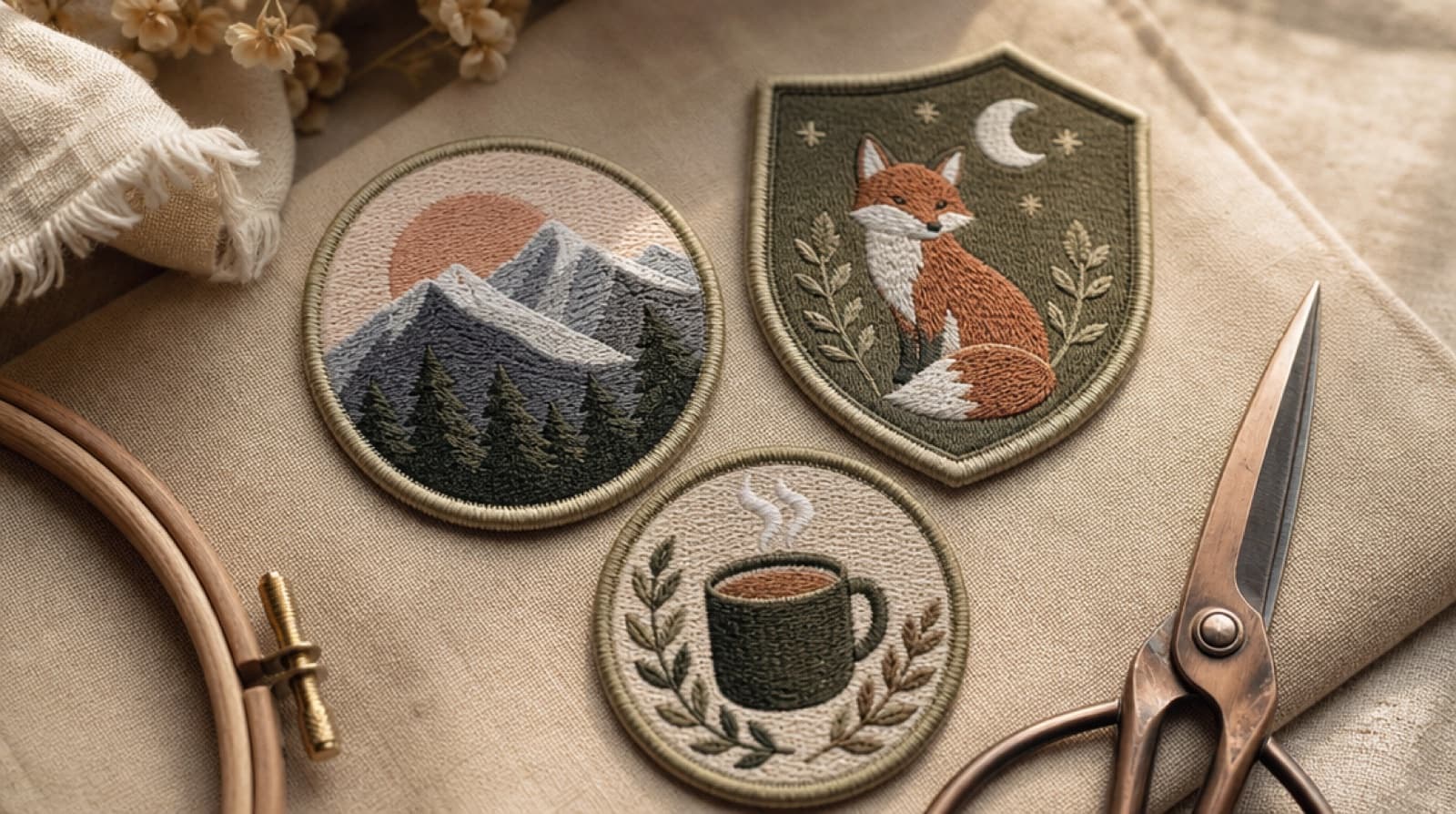
How to make embroidered patches, in short
- Make a patch design with a thick border around the outside, sized 60–90 mm for most patches.
- Hoop twill or felt over stabilizer, stitch the design, then unhoop and remove the extra stabilizer.
- Trim just outside the border with small sharp scissors and seal any cut twill edge.
- For an iron-on patch, fuse an iron-on adhesive sheet to the back, then press it onto the garment. Sew around the edge too if the item gets washed often.
If you want to know how to make embroidered patches at home, the good news is that your embroidery machine already does the hard part. A patch is just a design with a closed border, stitched on a sturdy base and cut out. This guide covers the three common patch methods, the materials, the right sizes for your hoop, a full step-by-step for how to make a patch on an embroidery machine, and how to turn the finished patch into an iron-on.
What you need to make embroidery patches
| Item | What to use | Why |
|---|---|---|
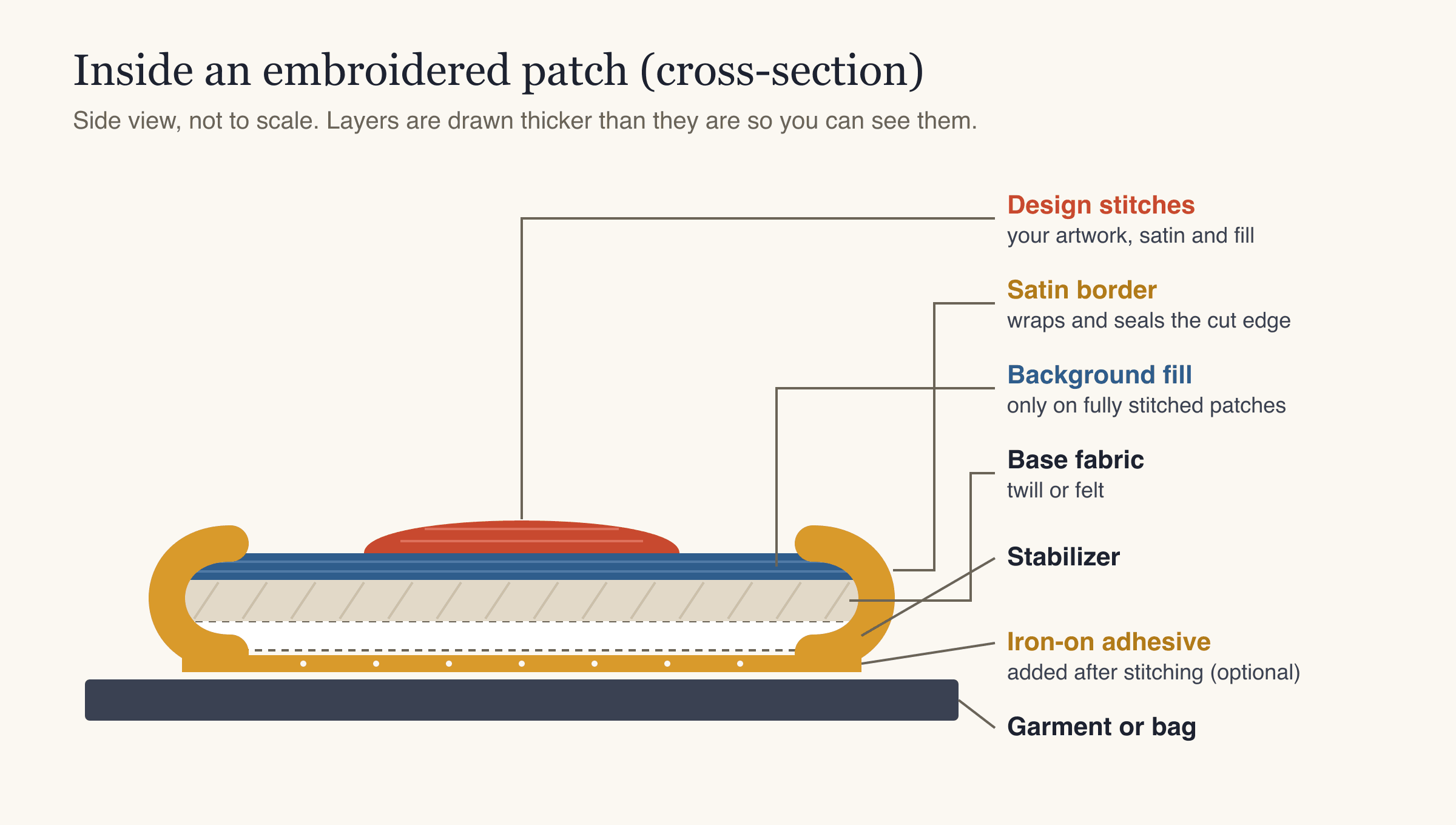
| Base fabric | Twill (cotton or polyester) or felt | Firm, stable and doesn't stretch. Felt doesn't fray, so it's the easiest to start with |
| Stabilizer | Medium tear-away; two layers or a heavy weight for dense patches. Cut-away if you want a stiffer patch | Holds the fabric flat while thousands of stitches go in |
| Embroidery thread | Polyester or rayon embroidery thread | Polyester is strong and holds its color well in the wash |
| Bobbin thread | Standard embroidery bobbin thread | Keeps the back of the patch flat |
| Needle | A fresh embroidery needle, 75/11 is common | Dense patches dull needles quickly |
| Scissors | Small, sharp, curved embroidery scissors | Clean cuts close to the border |
| Edge sealant | A fray-stopping liquid (for twill) | Stops cut fibers from poking out of the border |
| Iron-on adhesive (optional) | Iron-on adhesive sheet or fusible web | Turns the patch into an iron-on |
| Pressing cloth (optional) | Thin cotton cloth | Protects the stitches when you iron |
How to make embroidered patches: three methods
There are three main methods for DIY embroidered patches, and they all work for anyone learning how to make patches with an embroidery machine. They differ in what shows as the background and how much the machine has to stitch.
| Method | Background | Stitch count | Best for | Watch out for |
|---|---|---|---|---|
| Fabric-base patch | Twill or felt shows through | Lower | Quick patches, felt badges, fewer colors | Twill edges need sealing |
| Fully stitched patch | Every bit covered in thread | Higher | The classic "bought patch" look | Needs firm stabilizer; longer sew time |
| Freestanding patch | Stitched on wash-away stabilizer, no fabric | Highest | Patches with no fabric edge at all | Design must be fully stitched and dense, or it falls apart when rinsed |
If you're new to this, start with a felt fabric-base patch. Felt doesn't fray, so the trimming step is forgiving, and the stitch count stays low. Once that works, try a fully stitched patch on twill.
Step 1: Get the patch design ready
The design is where most patch problems start or end. Four things matter.
1. A closed, thick border. The border is a satin stitch (a smooth column of tight zigzag stitches) that runs all the way around the patch. It covers the cut edge and gives the patch its finished look. If you prepare the border in your artwork, draw it as a solid outline around the whole shape, roughly 3–4 mm wide at the finished size. StitchFile's Patch tool can add a satin border instead, so you do not need to draw one yourself. Thin outlines don't cover a cut edge well.
2. A simple shape. Circles, ovals, shields and rounded rectangles are the easiest to trim. Sharp inside corners and thin points are hard to cut cleanly and tend to fray.
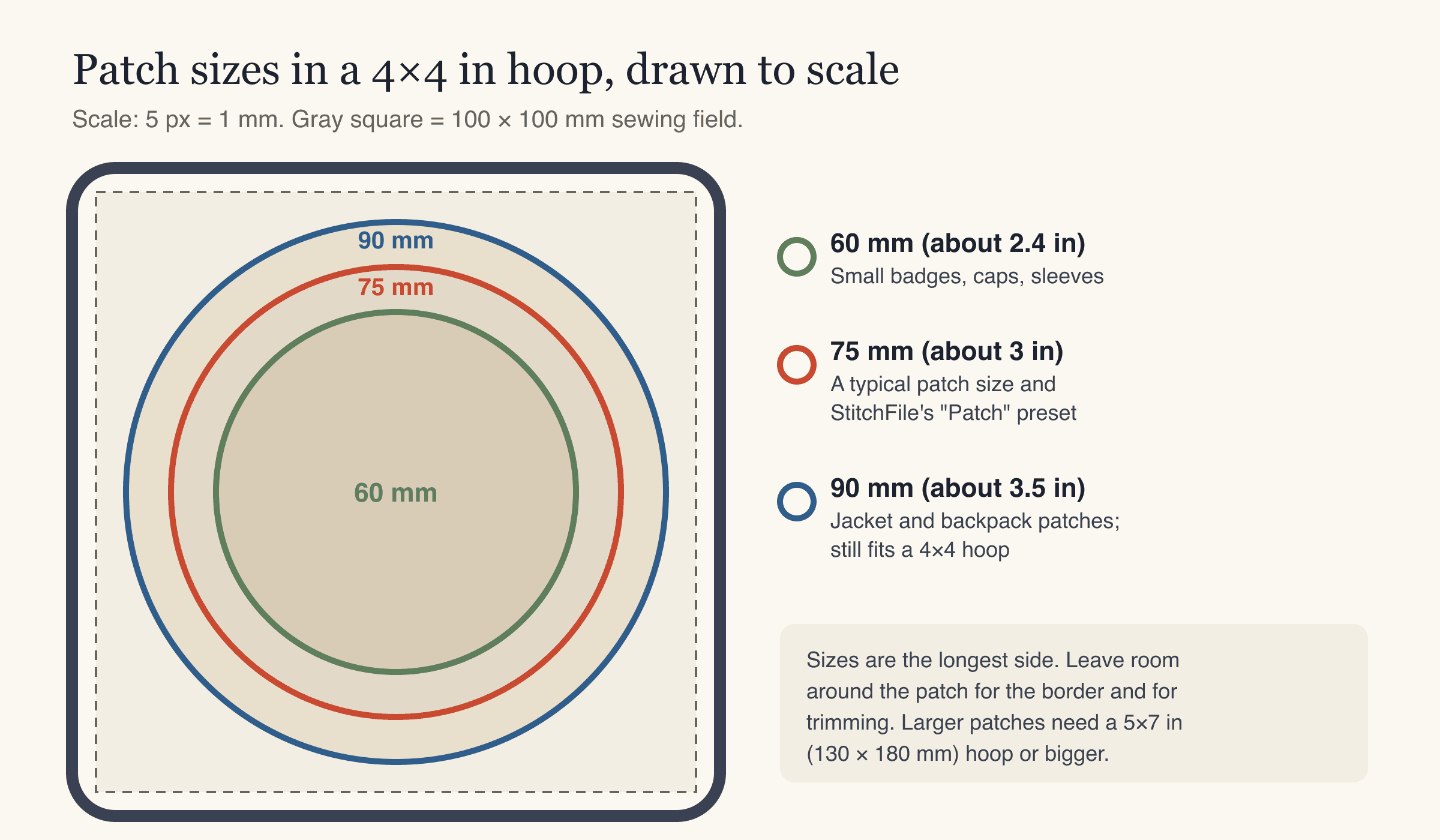
3. The right size. Most patches are 60–90 mm on the longest side. A 4×4 in hoop has a 100 × 100 mm sewing field, which fits a 90 mm patch with a little room to spare. Bigger patches need a 5×7 in hoop or larger. Our embroidery hoop sizes guide lists common sewing fields.
4. Lettering that's big enough. Small text is the first thing to turn into a blur. On twill and other woven fabrics, letters should be at least about 5 mm tall; on fleece or towel, about 7 mm. If your patch has a name or a slogan, check that first.
Turning your artwork into a patch file
To make a patch with an embroidery machine you need the design as a machine file (PES, DST, JEF, EXP or VP3, depending on your machine). If you're starting from a logo or drawing, upload it to StitchFile as SVG, PNG or JPG, choose the Patch size preset (75 mm) or type your own size, and pick Woven as the fabric for twill. That size preset only sets the size; it does not add a border.
On the website, open Patch below the finished preview to add a filled background and satin border. Choose a contour following the design, a circle or oval, a rounded rectangle, or a shield, and pick different background and border thread colors. If the original background is kept, select Background → Remove it first. The size is the whole patch's longest side, border included.
The free preview shows the stitched result, the stitch count, the sew time, the smallest hoop it fits, and a warning if any lettering is too small for the size you picked. The older preview below was made with Background → Keep it. It illustrates a fully stitched square background, rather than the separate border added by the Patch tool:
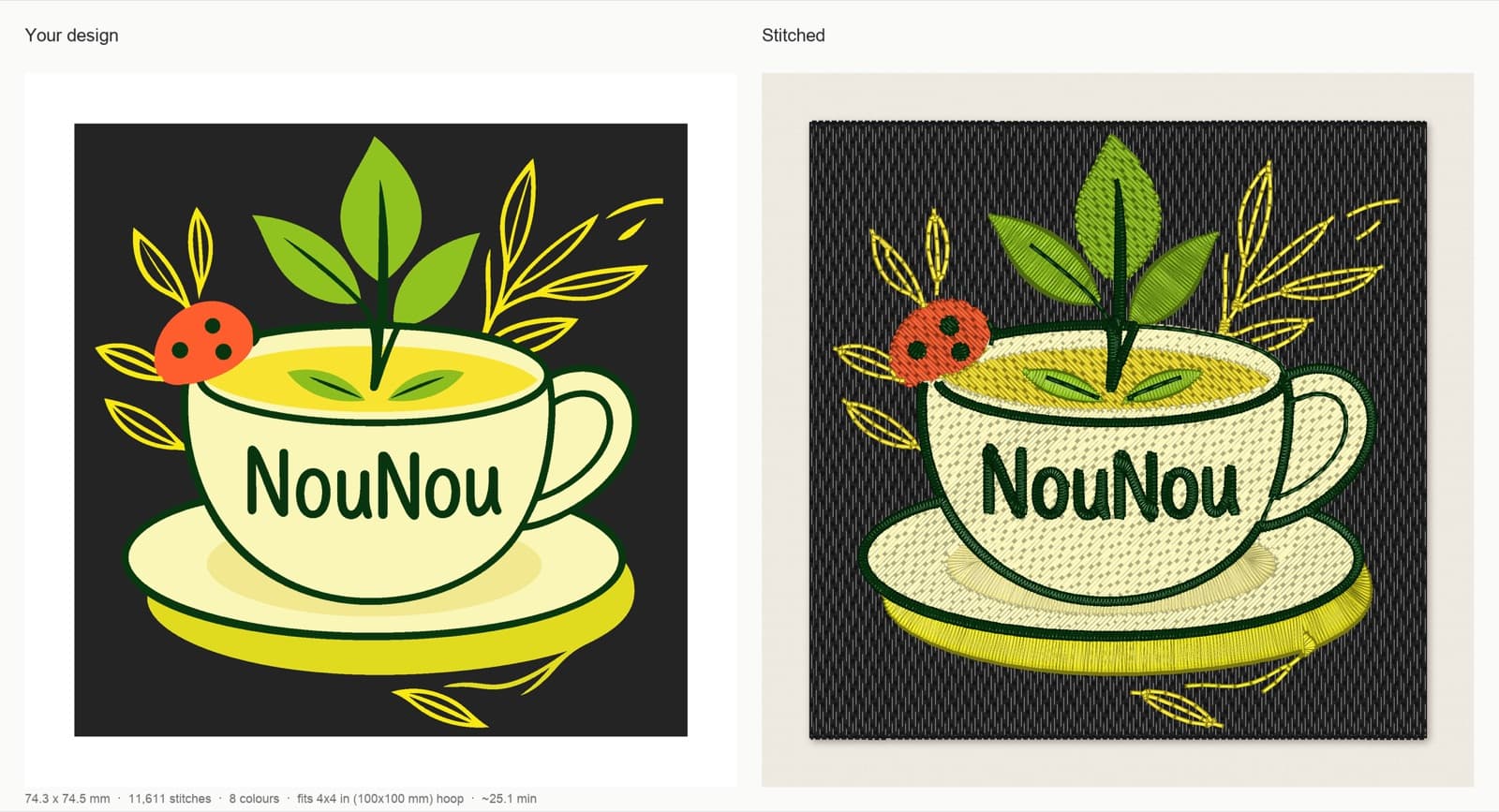
That stitch count is typical of why fully stitched patches need firm stabilizer: more than eleven thousand stitches in a 75 mm square pull hard on the fabric. If you'd rather have a quicker patch, leave the background off and let the twill or felt show.
For more on how artwork becomes stitches, see how to digitize a logo for embroidery.
Step 2: How to make a patch on an embroidery machine, step by step
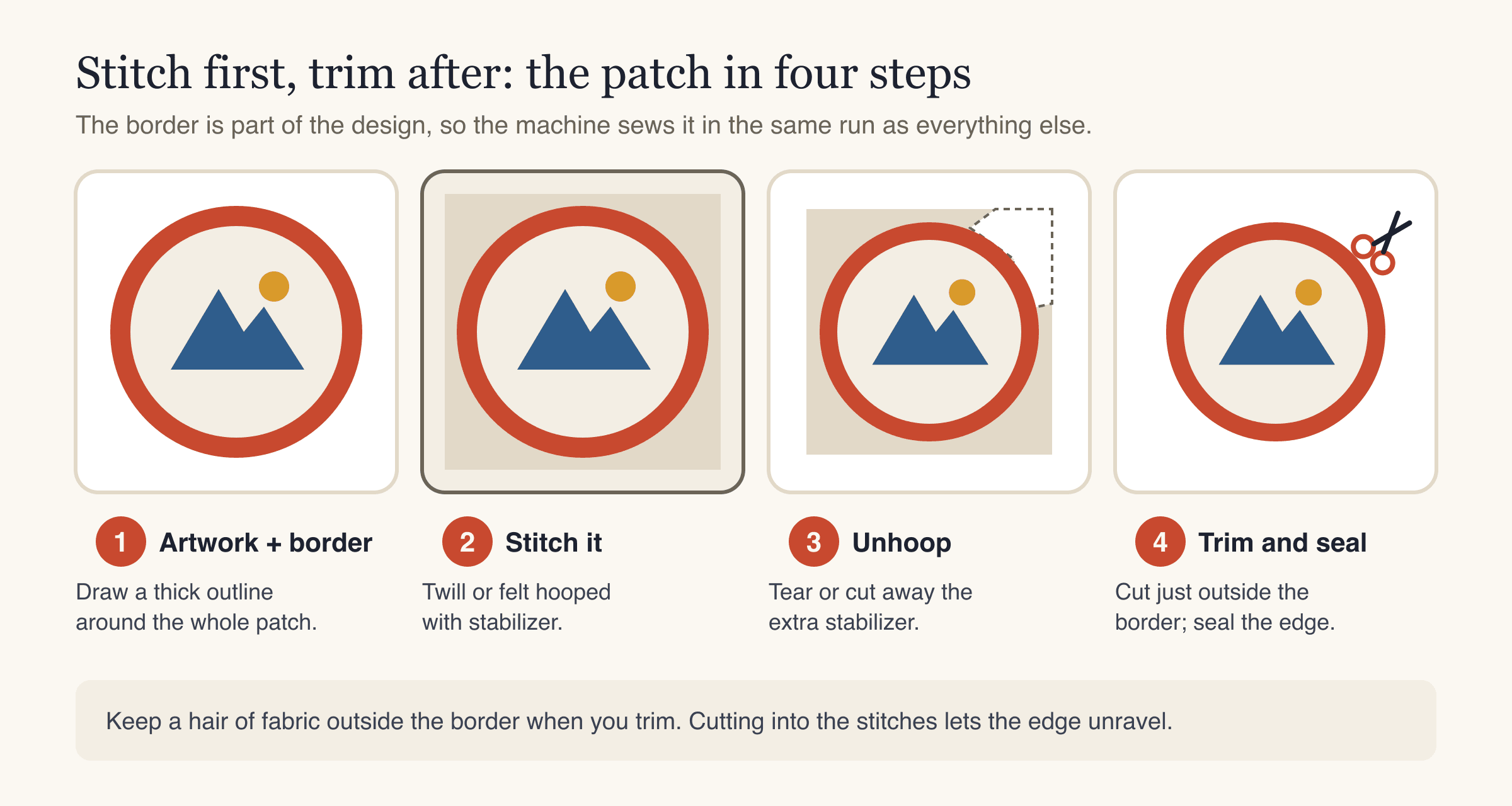
- Cut your base fabric a little larger than your hoop so you can grip it evenly on all sides.
- Cut the stabilizer the same size. For a fabric-base patch, one layer of medium tear-away is usually enough. For a fully stitched patch, use two layers or a heavy weight, or cut-away if you want a stiffer patch.
- Hoop the fabric and stabilizer together. The fabric should be drum-tight but not stretched. Twill and felt don't stretch much, which is one reason they make good patch bases.
- Load the design on the machine and check its position on the screen. Make sure the whole patch, including the border, sits inside the sewing field.
- Thread the first color from the thread color list and put in a fresh needle.
- Stitch the patch. Change threads as the machine stops for each color. Watch the first color for a minute or two; if the fabric starts to pucker, the stabilizer is too light.
- Unhoop once the border is finished. Tear away the extra stabilizer from around the outside (or cut it, if you used cut-away). Leave the stabilizer that's under the stitches.
- Trim the patch. Cut just outside the satin border, close but never into the stitches. Small, curved scissors make this easier. Rotate the patch rather than your hand.
- Seal the edge on twill. Run a thin line of fray-stopping liquid along the cut edge and let it dry. Felt doesn't need this.
- Trim any stray threads on the front and back, and give the patch a light press from the back with a pressing cloth.
Making a freestanding patch
For a patch with no fabric at all, hoop two layers of a heavy, fabric-like wash-away stabilizer, stitch a fully stitched design (background kept), trim, and rinse away the stabilizer following its instructions. Let it dry flat. This only works when every part of the design is covered with dense stitching, because the stitches are all that hold the patch together once the stabilizer dissolves.
How to make iron-on embroidered patches
An iron-on patch is a normal patch with a heat-activated adhesive on the back. You can add it to any patch you've made.
- Cut a piece of iron-on adhesive slightly larger than the patch.
- Fuse it to the back of the patch with an iron, following the adhesive's instructions for heat and time. Use a pressing cloth over the paper side.
- Let it cool completely, then trim the adhesive to the patch shape, just inside the edge.
- Peel off the backing paper.
- Place the patch on the garment, adhesive side down. Check the position (for a left-chest or sleeve patch, see our logo placement and size guide).
- Press firmly with a pressing cloth on top. Hold the iron still, don't slide it. Then turn the garment inside out and press from the back as well.
- Let it cool before you move it, and wait as long as the adhesive's instructions say before washing.
Iron-on adhesive works best on cotton, denim and canvas. It holds less well on stretchy knits, and it isn't suitable for heat-sensitive fabrics such as some nylons and coated waterproof fabrics. For anything that will be washed often, sew a line of stitches around the border after ironing. The iron-on holds the patch in place; the stitching keeps it there.
Iron-on, sew-on or something else?
| Attachment | Effort | How long it holds | Best for |
|---|---|---|---|
| Iron-on adhesive | Low | Can lift after many washes | Jackets, bags, hats washed rarely |
| Sew-on (by hand or machine) | Medium | Very durable | Workwear, kids' clothes, anything washed often |
| Iron-on + sewn edge | Medium | Very durable | The safest choice for clothing |
| Hook-and-loop backing | Medium | Removable | Patches you want to swap |
Common mistakes when making DIY embroidered patches
- No border, or a border that's too thin. The cut edge frays and the patch looks homemade in the wrong way. Plan a solid border in the artwork.
- Too-light stabilizer on a fully stitched patch. Thousands of stitches pull the fabric in and the patch curls or puckers. Use two layers or a heavy stabilizer.
- Stretchy base fabric. T-shirt knit and similar fabrics distort under dense stitching. Use twill or felt.
- Cutting into the border. One snip into the satin stitches and the edge starts to unravel. Leave a hair of fabric outside the stitches.
- Lettering too small. Text under about 5 mm tall on twill merges into blobs. Make the patch bigger or drop the small text.
- Patch bigger than the hoop. Check the design size against your machine's maximum embroidery area before stitching.
- Ironing straight onto the stitches. High heat can flatten or shine the thread. Always use a pressing cloth.
- Skipping the test. Stitch your first patch on scrap fabric, check the border coverage and the back, then make the real batch.
If something still looks off, our machine embroidery troubleshooting guide covers puckering, gaps and thread problems.
FAQ
What fabric is best for making embroidered patches?
Twill and felt are the most common choices. Twill gives the classic patch look and a firm base; felt is easier for beginners because it doesn't fray when cut. Avoid stretchy fabrics, which distort under dense stitching.
What size should an embroidered patch be?
Most patches are 60–90 mm (about 2.4–3.5 in) on the longest side. Around 75 mm is a typical size for jackets and bags, and it fits easily in a 4×4 in hoop. Smaller patches suit caps and sleeves; larger ones need a 5×7 in hoop or bigger.
Do I need special software to make patches with an embroidery machine?
You need a machine file of the patch design with a border included. On the StitchFile website, use Patch below the preview to choose a shape, background and satin border. Remove the original background first if it is kept. The Patch size preset sets 75 mm; the Patch tool adds the background and border. Check the new preview, then download PES, DST, JEF, EXP and VP3.
How do you keep embroidered patch edges from fraying?
Include a thick satin border in the design, trim just outside it without cutting the stitches, and seal cut twill edges with a fray-stopping liquid. Felt doesn't fray, so it needs no sealing.
Are iron-on patches permanent?
Iron-on adhesive holds well, but it can lift over many washes, especially on stretchy or synthetic fabrics. For clothes you wash often, iron the patch on and then sew around the border. Washing inside out on a gentle cycle also helps.
How long does it take to make an embroidered patch?
Machine time depends on the size and stitch count. A 75 mm fully stitched patch in our example took about 25 minutes at 700 stitches per minute, while a design that leaves the background as fabric sews much faster. Allow a few extra minutes for thread changes, trimming and sealing.
Make your first patch
Making embroidered patches comes down to a closed border, a firm base fabric, enough stabilizer and careful trimming. Start with felt and a simple round design, test it once, and you'll have the process down by the second patch.
If you have the artwork but not the machine file, upload it to StitchFile, pick the Patch size preset and your fabric, then use the Patch tool on the website and check the new free stitch preview. You'll see the stitch count, sew time and the smallest hoop it fits before you download.