Embroidery guide
Satin Stitch Embroidery vs Fill Stitch: Machine Stitch Types
Satin stitch embroidery vs fill stitch explained: when to use satin, tatami fill or running stitch, plus underlay, density and pull compensation basics.
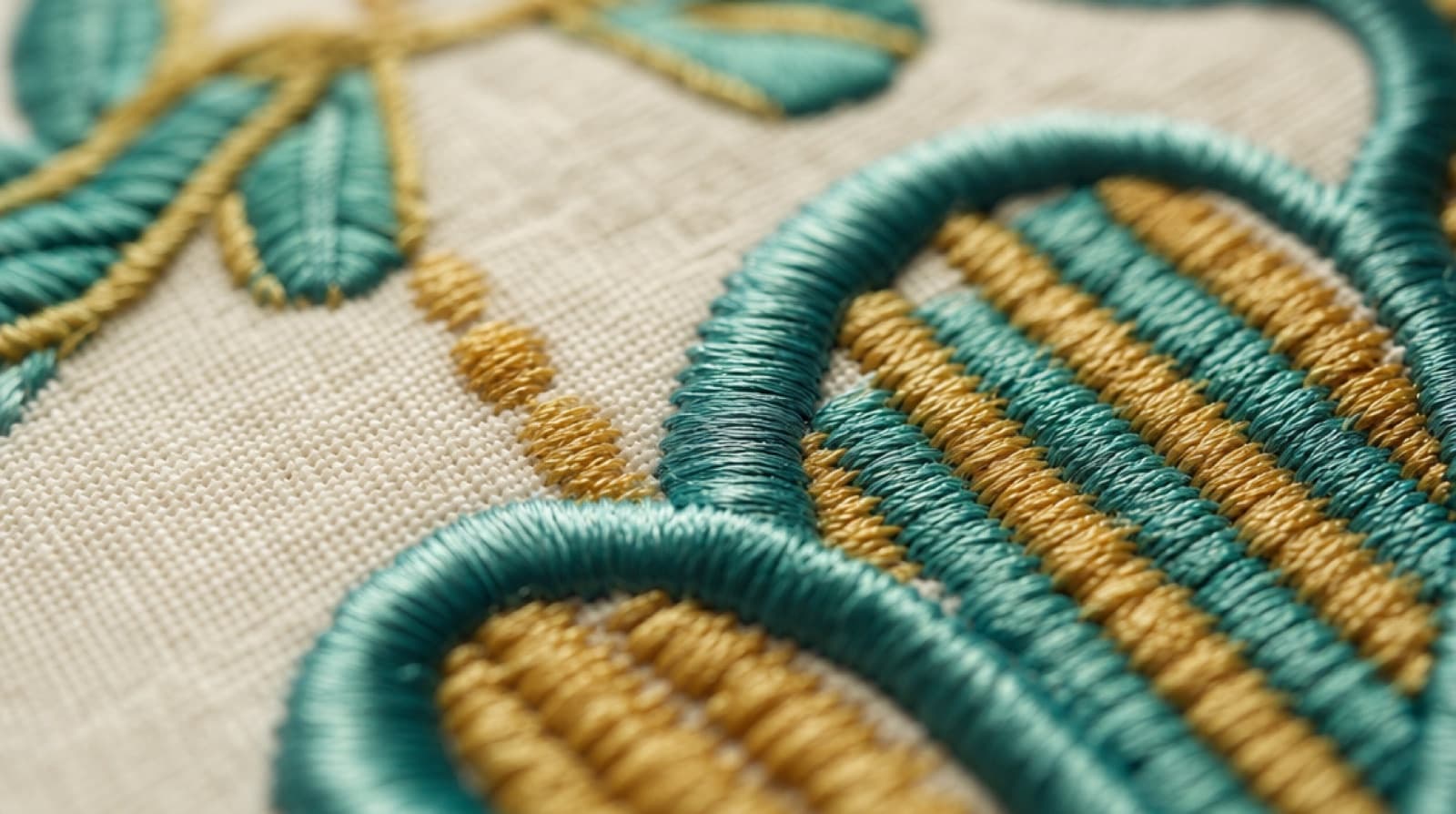
In machine embroidery, satin stitch embroidery is used for narrow shapes like borders and lettering, and fill stitch is used for large areas. Satin stitches zigzag from one edge of a shape to the other, giving a smooth, shiny column. Fill stitches lay down rows of short stitches that cover big areas flat and firm. Running stitch, the third basic type, draws single lines. This guide explains how each one is built, when to use which, and the settings behind them: underlay, density and pull compensation.
Quick answer
- Satin stitch: zigzag columns about 1–7 mm wide. Shiny and raised. Best for borders, outlines and most lettering.
- Fill (tatami) stitch: rows of short running stitches about 0.4 mm apart. Flat and durable. Best for any area wider than about 7 mm.
- Running stitch: a single line. For fine details, underlay and travel between shapes.
- Good results also need underlay (stitches sewn first to hold the fabric), the right density, and pull compensation (extra width to cancel thread pull).
The three types of machine embroidery stitches
Almost every embroidery file, however complex, is built from three types of machine embroidery stitches. Special effects (3D foam, appliqué, cross-stitch fills, motif fills) are variations on these.
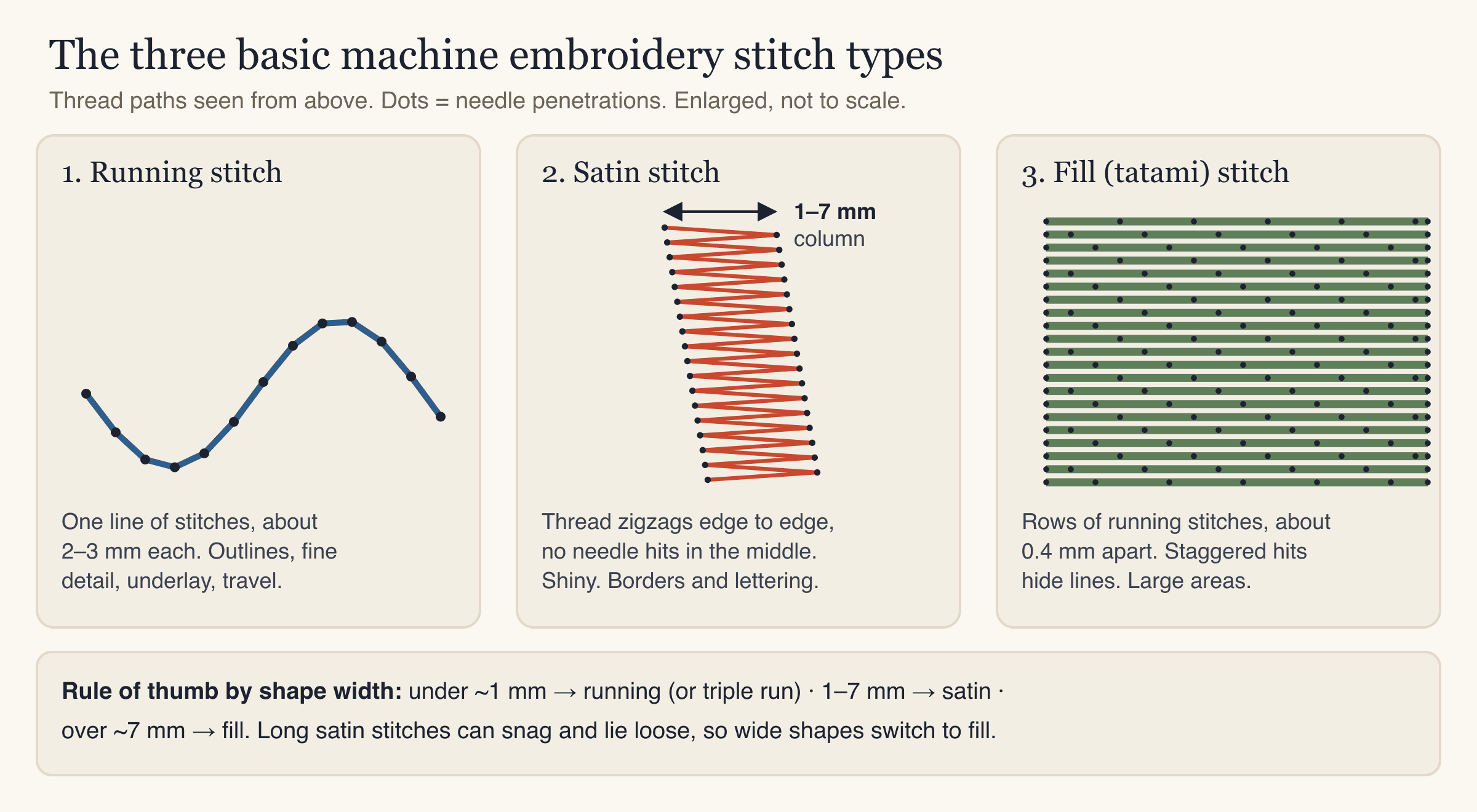
| Running stitch | Satin stitch | Fill (tatami) stitch | |
|---|---|---|---|
| What it looks like | A single line | A smooth, shiny band | A flat, woven-looking surface |
| How it is built | One stitch after another along a path | Zigzag from edge to edge across a column | Rows of running stitches, offset row to row |
| Typical width | One thread line (triple run for bolder) | About 1–7 mm | Any area wider than about 7 mm |
| Typical stitch length | About 2–3 mm | Same as the column width | About 3–4 mm per stitch |
| Best for | Fine detail, outlines, underlay, travel | Borders, lettering, narrow shapes | Large shapes, backgrounds, patches |
| Durability | Good | Good when not too wide; long stitches can snag | Very good |
Satin stitch embroidery: how it works
A satin stitch goes back and forth from one edge of a shape to the other. The needle only enters the fabric on the two edges, so the thread lies on top in long, parallel strands. Light hits those strands evenly, which is why satin looks shiny and slightly raised.
That construction is also its limit. The stitch length equals the width of the column:
- Under about 1 mm, the column is too thin. The stitches pile up, and the line looks thready or breaks up. A running or triple-run line works better here.
- Between about 1 and 7 mm, satin looks its best.
- Over about 7 mm, the long stitches lie loose. They can catch on buttons, fingernails and washing machines, and the column may look flat in the middle. Some digitizers go slightly wider on stable fabrics, but most switch to fill or split the satin (break it into shorter stitches) at this point.
Satin is the usual choice for:
- Borders and outlines around filled shapes. The satin edge hides the end of the fill rows and gives a clean, finished line.
- Lettering from about 5 mm tall upward. Satin follows the strokes of each letter, so text reads crisply.
- Narrow shapes like stripes, stems, whiskers and thin parts of a logo.
Here is what that looks like in a real StitchFile preview. The black outlines are satin columns; the orange and white areas are fill.
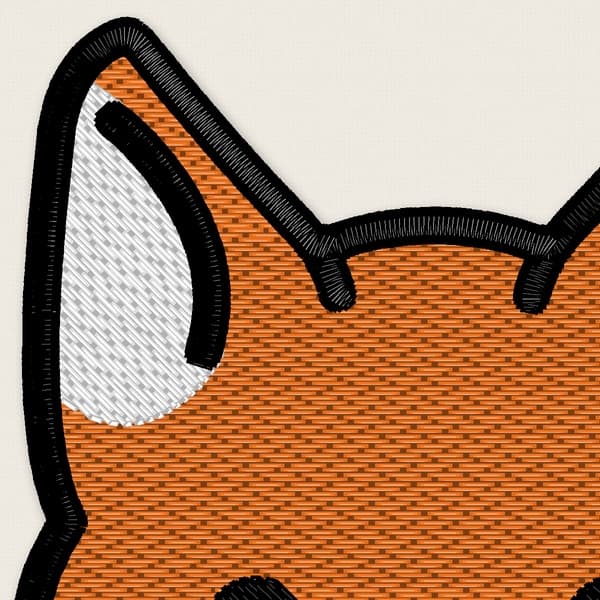
Close-up of a StitchFile stitch preview. The satin borders show the diagonal, shiny strands crossing the column; the fill shows the flat, brick-like rows.
Satin stitch direction
Satin stitches are always laid across the column, roughly at right angles to its path. On curves, the stitch angle turns with the shape so the strands stay even. If the angle is wrong, the stitches look slanted or the column narrows on the inside of curves. Good digitizing keeps the stitches evenly spaced around turns.
Fill stitch embroidery: tatami and other fills
Fill stitch embroidery covers large areas with rows of running stitches. The most common pattern is the tatami stitch, named after Japanese tatami floor mats because of its woven look. Each row of short stitches (about 3–4 mm each) runs across the shape, and each row starts a little offset from the one before. The needle holes form a staggered pattern instead of a straight line, so you don't see channels or lines running across the shape.
Fill stitch is the right choice when:
- A shape is wider than about 7 mm.
- You need durability. Short stitches don't snag, which matters for workwear, bags and patches.
- You want a flatter, more matte look. Fill reflects less light than satin, which can make it look slightly darker in the same thread.
The direction of the rows matters too. Changing the fill angle between neighboring shapes makes them catch the light differently, which separates two areas of the same color. Most designs use different angles for shapes that touch.
Running stitch: lines, detail and travel
A running stitch is a single line of stitches, one after another. On its own it is thin, so designs use a double run (the line sewn twice) or triple run (three times, sometimes called a bean stitch) for bolder lines that still stay narrow.
Running stitch has three jobs:
- Fine detail that is too thin for satin, such as hair lines or small outlines.
- Underlay, sewn before the top stitches (more below).
- Travel, moving the needle from one shape to the next without a trim. Good files hide travel stitches under later stitching.
Underlay: the stitches you don't see
Underlay is a layer of stitches sewn first, under the satin or fill. You never see it in the finished piece, but it has a big effect on quality:
- It holds the fabric to the stabilizer so it doesn't shift while the top stitches go down.
- It lifts the top stitches so they don't sink into textured fabrics like piqué or towel.
- It gives satin a fuller, rounder look.
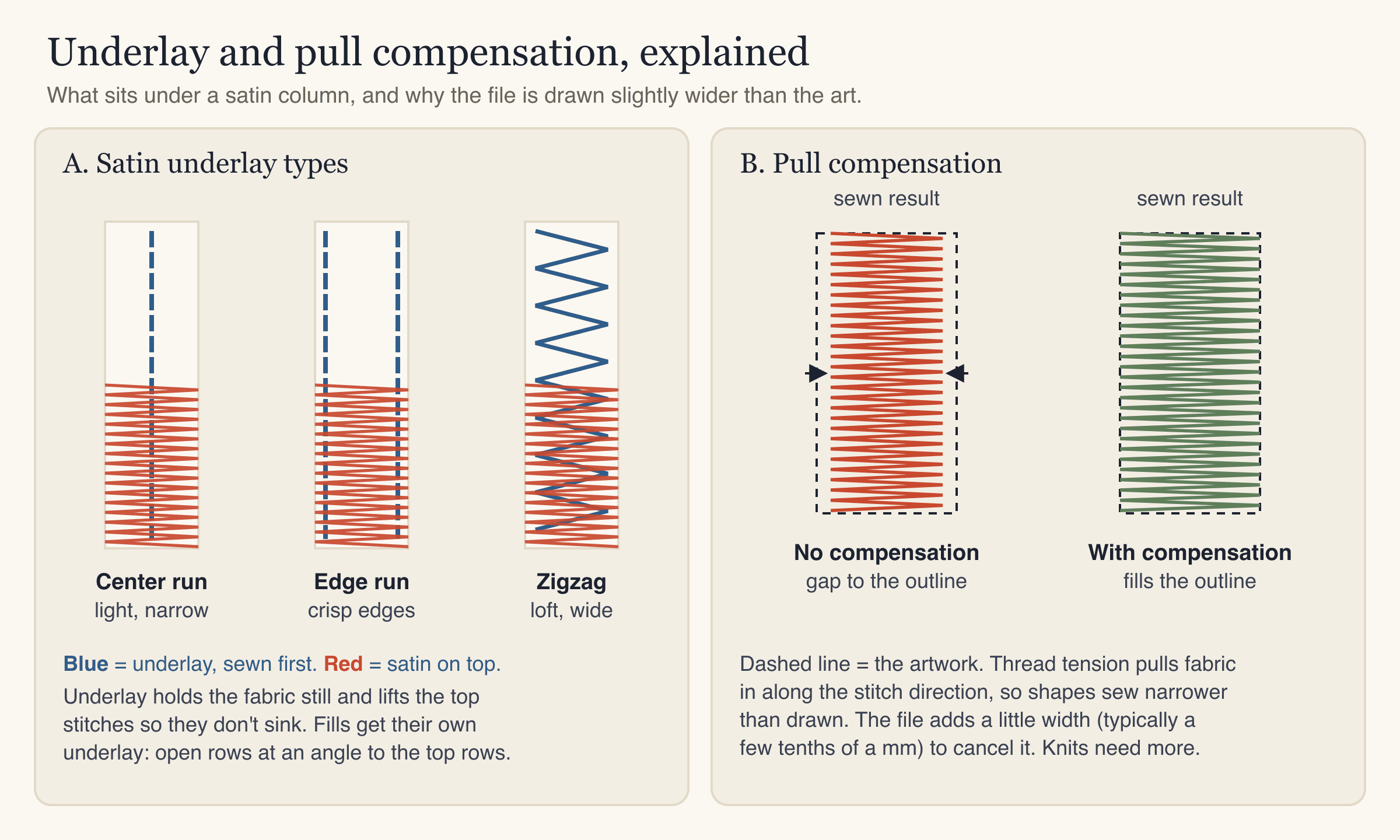
The common underlay types:
| Underlay | What it is | Used for |
|---|---|---|
| Center run | One running line down the middle of a satin column | Narrow columns and small lettering |
| Edge run | Running lines just inside both edges | Crisp edges on medium columns |
| Zigzag | A loose, open zigzag inside the column | Wider columns, more loft |
| Fill underlay | Open rows at an angle to the top rows | Fill areas, to lock the fabric down |
Many files combine types, such as an edge run plus a zigzag for a wide satin border. Thick or fluffy fabrics need more underlay; thin, stable fabrics need less.
Embroidery density: how close the stitches sit
Embroidery density is the spacing between stitches: the distance between the zigzags in a satin column, or between the rows in a fill. It is usually written as a distance in millimeters, and a smaller number means denser stitching. About 0.4 mm is a common starting point for standard 40-weight embroidery thread.
Density is a balance:
- Too sparse: fabric shows between the rows, especially with light thread on dark fabric.
- Too dense: the design gets stiff and bulletproof, needles deflect, thread breaks, and the fabric can pucker or even tear.
Density should also change with size. Shrinking a finished stitch file by a lot keeps the same number of stitches in a smaller space, so it gets too dense. Enlarging it spreads them out and leaves gaps. That's why making the file at its final size matters (see embroidery logo placement and size for typical sizes).
Pull compensation in embroidery
Pull compensation is extra width added in the file to cancel the way stitches pull the fabric. As each stitch tightens, it draws the fabric in along the direction of the stitch. A satin column comes out narrower than drawn, and fill shapes shrink in the direction of the rows. Without compensation, outlines don't meet the fills they should cover, and fabric peeks through.
The fix is to make shapes a little wider in the stitch direction, usually by a few tenths of a millimeter. The amount depends on the fabric:
- Stable wovens (twill, canvas, denim) need the least.
- Knits and piqué stretch, so they need more.
- Towel and fleece need more again, plus a topping so stitches don't sink.
There is a related effect called push. While stitches pull a shape in along the stitch direction, they push it out the other way, so the ends of a satin column can sew slightly longer than drawn. Experienced digitizers allow for both.
How StitchFile sets these for you
You don't have to set every value by hand. StitchFile chooses the stitch type for each shape automatically: satin that follows outlines and lettering, fill with underlay for larger areas, and running stitches for fine lines. The fabric you pick sets density, pull compensation and the recommended stabilizer, and colors are layered slightly under each other so no fabric peeks through. No stitch is ever longer than 7 mm.
You can see the settings in the report that comes with every design. For the fox design shown above, the woven setting used fill rows 0.40 mm apart with 0.25 mm pull compensation. The same design on polo piqué used 0.42 mm rows with 0.35 mm pull compensation, because the knit pulls more. In both, satin columns run between 0.8 and 7.0 mm wide.
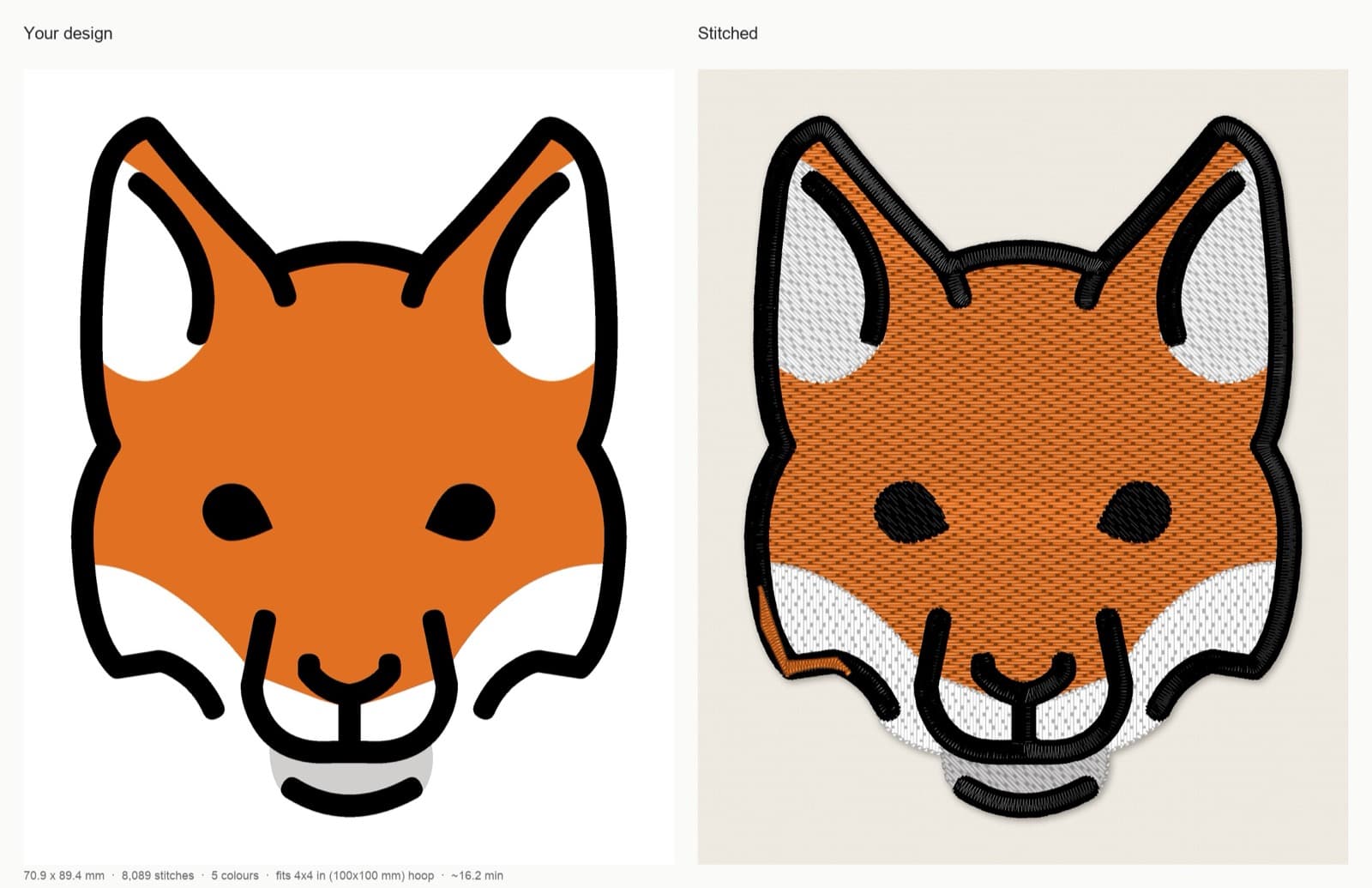
StitchFile stitch preview on woven fabric: 70.9 × 89.4 mm, 8,089 stitches, 5 color stops, fits a 4×4 in (100×100 mm) hoop, about 16.2 minutes at 700 stitches per minute.
Artwork: OpenMoji fox, CC BY-SA 4.0. StitchFile converted the artwork into the stitch previews and close-up shown here; these adaptations are shared under the same license.
On the website, two free controls adjust stitch style and fill coverage. Lettering switches existing text between automatic, satin (smooth, shiny) and fill (flat rows, for big or bold letters). Density → Fuller puts the fill rows closer together over thicker underlay, which helps when fabric shows through or you sew light thread on dark fabric.
How to choose between satin and fill: step by step
- Measure the narrowest part of each shape at the final size, not on screen.
- Under about 1 mm wide? Use a running or triple-run line, or thicken the shape in the artwork.
- About 1–7 mm wide? Use satin. This covers most outlines, borders and lettering.
- Over about 7 mm wide? Use fill. For a wide border that should look like satin, use a split satin.
- Check the lettering height. Satin text needs letters about 5 mm tall on woven fabrics, 6 mm on knits and piqué, 7 mm on towel and fleece. Our embroidery lettering guide goes deeper.
- Add a satin border around fills where you want a clean edge. It covers the uneven ends of the fill rows.
- Match density and pull compensation to the fabric, then test-sew on scrap of the same fabric with the same stabilizer.
Common mistakes
- Satin that is too wide. Long, loose stitches snag and look flat. Switch to fill or a split satin over about 7 mm.
- Satin that is too narrow. Under about 1 mm, it breaks up. Use a running or triple-run line instead.
- Resizing a stitch file by a large amount. Density and pull compensation were set for the original size. Make a new file at the new size.
- No underlay on textured fabric. Stitches sink into piqué, fleece and towel. Use underlay and a water-soluble topping.
- Too dense. Stiff, puckered designs and broken thread often mean the stitching is too dense for the fabric. More stitches is not always better.
- Ignoring pull compensation. Gaps between outlines and fills usually mean too little compensation, or fabric moving in the hoop.
- Blaming the file for hooping problems. Puckering and shifting outlines are often caused by loose hooping or the wrong stabilizer. Our troubleshooting guide covers the usual causes.
FAQ
What is the difference between satin stitch and fill stitch?
Satin stitch zigzags from edge to edge across a narrow column, so the thread lies in long, shiny strands. Fill stitch covers wide areas with rows of short running stitches. Use satin for borders and lettering about 1–7 mm wide, and fill for anything wider.
What is a tatami stitch?
A tatami stitch is the most common fill stitch in machine embroidery. It uses rows of short running stitches, with each row offset from the last so the needle holes don't line up. The result is a flat, durable surface that looks a little like a woven tatami mat.
How wide can a satin stitch be?
Most satin columns are about 1–7 mm wide. Over about 7 mm, the stitches get long and loose and can snag. Wider shapes are usually sewn as fill or as a split satin.
What is a good embroidery density?
About 0.4 mm between rows is a common starting point for 40-weight thread. Light thread on dark fabric often needs slightly denser stitching, and stretchy or thin fabrics may need slightly less to avoid puckering. Always test-sew on the same fabric.
What is pull compensation in embroidery?
Pull compensation is extra width added to shapes in the embroidery file. Stitches pull the fabric in as they tighten, so shapes sew narrower than drawn. Adding a few tenths of a millimeter, more on knits, keeps outlines and fills lined up.
Is satin stitch good for small text?
Yes. Satin is usually the best stitch for lettering, because it follows each stroke and gives clean edges. The letters still need to be at least about 5 mm tall on woven fabric and 6 mm on knits to stitch cleanly.
Turn your artwork into satin and fill stitches
Choosing stitch types, underlay, density and pull compensation for every shape takes time to learn. If you want a file with those choices already made for your size and fabric, upload your artwork to StitchFile. You'll see a free stitch preview with satin borders, fills and lettering before you buy, and every purchase includes PES, DST, JEF, EXP and VP3 files. For the bigger picture, read our guide on how to digitize a logo for embroidery.