Embroidery guide
Machine Embroidery for Beginners: Your First Project Step by Step
Machine embroidery for beginners: what to look for in a first machine, which needles, thread and stabilizer to buy, and your first project step by step.
Quick answer: Machine embroidery for beginners comes down to five things.
- A machine with a hoop big enough for what you want to make (5×7 in covers most first projects) and a USB port or app for loading designs.
- Embroidery needles (75/11 to start), 40 weight embroidery thread, bobbin thread and the right stabilizer.
- A design file in your machine's format, sized to fit your hoop.
- Fabric hooped smooth and drum-tight with stabilizer underneath.
- A test sew on scrap fabric before the real thing.
This guide to machine embroidery for beginners walks you through choosing a machine, buying the right supplies, and stitching your first design from start to finish. It covers the parts manuals tend to skip: why hooping matters more than settings, what the numbers on needles and thread mean, and where design files come from.
Machine embroidery for beginners: how it works
An embroidery machine doesn't sew the way a sewing machine does. You don't guide the fabric. Instead:
- The fabric is clamped in a hoop (a two-part frame) with a stabilizer (a backing material) underneath.
- The hoop clips onto an embroidery arm that moves it left, right, forward and back under the needle.
- The machine follows a design file: a list of every stitch, color change and trim. Your job is to hoop well, thread each color when the machine stops, and watch.
That design file is the part beginners often don't expect. A picture or a logo isn't something the machine can read. It has to be turned into stitches first, a step called digitizing. Machines come with built-in designs and lettering, and for anything else you need a file made for embroidery.
Choosing an embroidery machine for beginners
There's no single best embroidery machine for beginners. The right one is the machine that fits what you want to make. Rather than ranking models, here's what to look for and why it matters.
Embroidery-only, combo, or multi-needle?
- Embroidery-only machines do embroidery and nothing else. They're the usual entry point.
- Combination machines sew and embroider. The embroidery unit attaches to a regular sewing machine. Good if you also want a sewing machine, but you can't sew and embroider at the same time.
- Multi-needle machines hold several colors at once and change between them on their own. They're faster for repeat work and are what most embroidery businesses use, but they cost much more and take more space. Most people start on a single-needle machine.
What to check before you buy
| Feature | Why it matters | What to look for |
|---|---|---|
| Maximum embroidery area (hoop size) | The biggest design you can sew in one hooping | 4×4 in is very limiting; 5×7 in covers most first projects; 6×10 in or larger for big designs |
| Hoops included | A smaller hoop holds small pieces better | At least one large and one small hoop; check what extra hoops cost |
| Design transfer | You'll load designs constantly | A USB port; some machines also take designs through the maker's app or wirelessly |
| File formats it reads | Decides which design files work | The format listed in the manual (see the table below) |
| Screen and editing | Positioning and rotating designs at the machine | A screen that lets you move, rotate and resize slightly, and trace the outline |
| Automatic thread cutter | Fewer jump threads to trim by hand | Nice to have; saves time on multi-color designs |
| Needle threader | You'll rethread for every color | A built-in threader saves a lot of squinting |
| Support | Help when something goes wrong | A dealer or service center near you, plus classes or a good manual |
The hoop size is the one that's hardest to change later. If you know you want to embroider bag fronts, large lettering or the back of a jacket, choose a larger embroidery area from the start. Our embroidery hoop sizes guide has full charts.
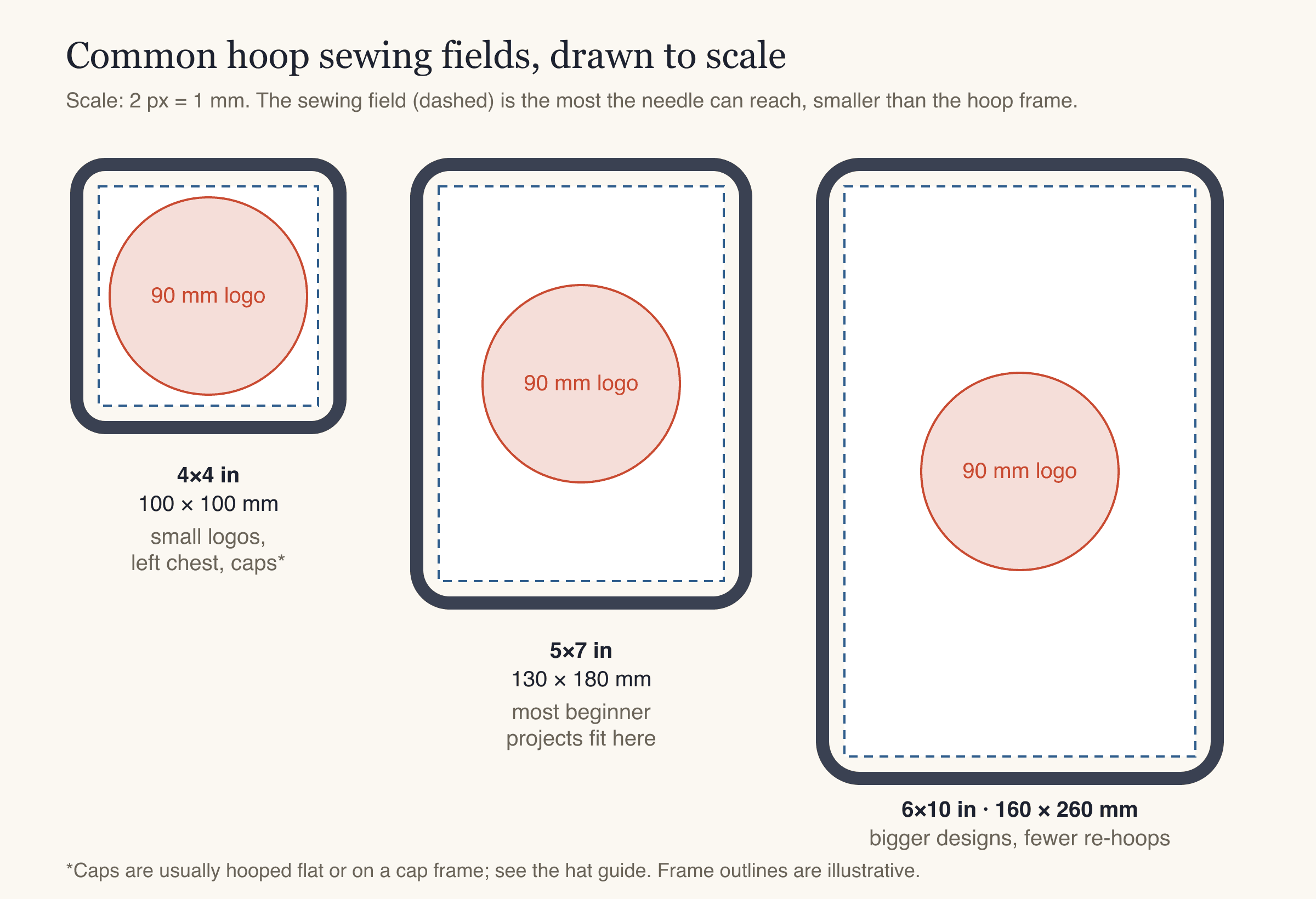
Common sewing fields at the same scale. A 90 mm left-chest logo fits all three; a 5×7 in field leaves room for most beginner projects.
File formats by machine brand
Each machine brand reads its own design format. Many machines read more than one, and your manual lists them.
| Format | Machines |
|---|---|
| PES | Brother, Baby Lock |
| JEF | Janome (and many Elna machines) |
| VP3 | Husqvarna Viking, Pfaff |
| EXP | Bernina, Melco |
| DST | Tajima and most commercial and multi-needle machines |
Supplies you need before your first stitch-out
Embroidery machine needles
Embroidery machine needles are made for the job: a larger eye and a special groove reduce friction on embroidery thread, which runs through the needle thousands of times faster than in normal sewing. Regular sewing needles work, but they shred thread more often.
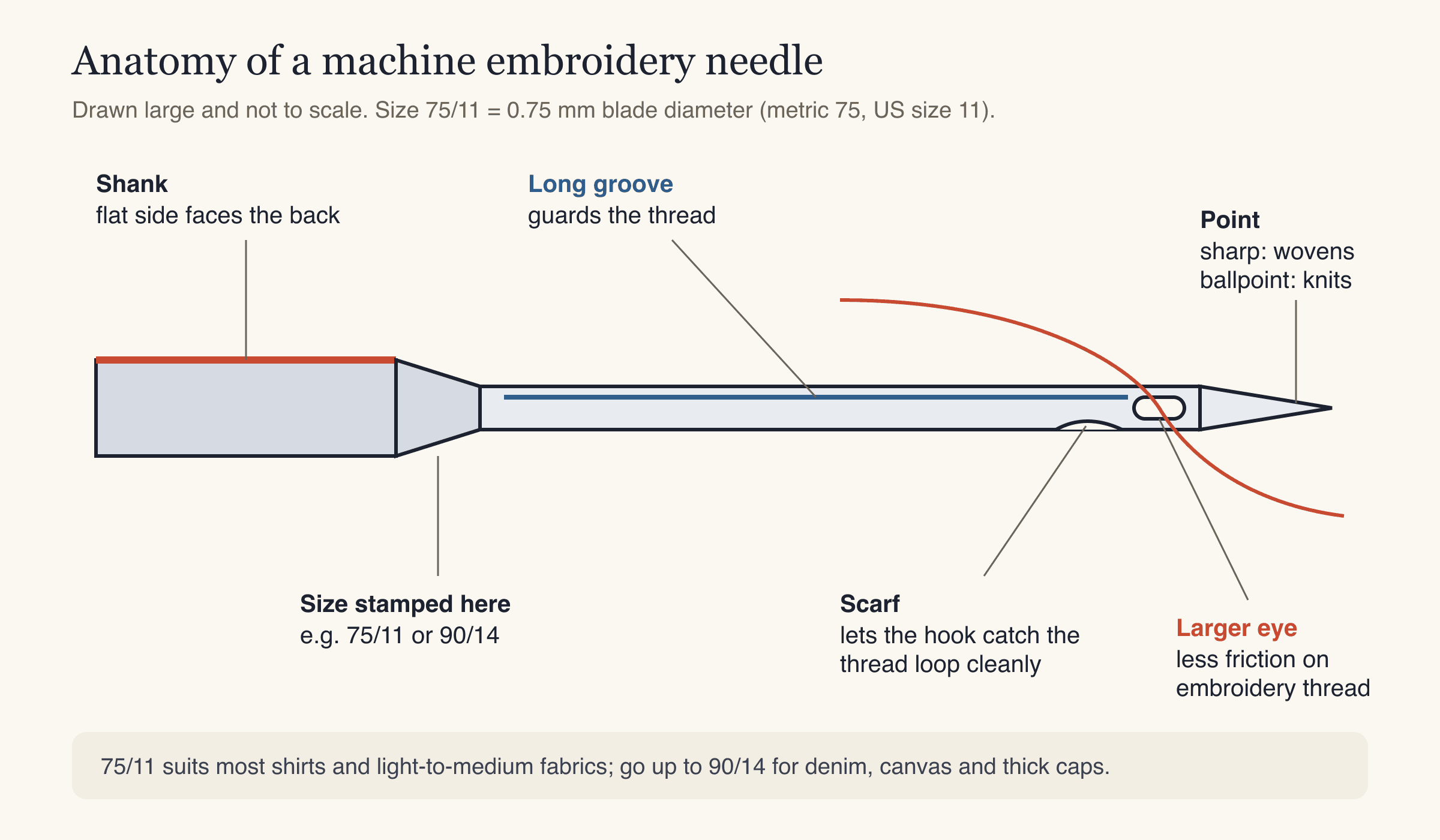
The parts of an embroidery needle. The number on the shank is the size: 75/11 means 0.75 mm across the blade.
| Needle | Use it for |
|---|---|
| 75/11 sharp | Most woven fabrics: cotton, quilting cotton, shirts, tote bags |
| 75/11 ballpoint | T-shirts and other knits (pushes between the loops instead of cutting them) |
| 90/14 | Denim, canvas, heavy twill, thick caps |
| Titanium-coated | Same sizes; the coating wears more slowly, useful for long runs and adhesive stabilizers |
Change the needle when you hear a punching sound, see skipped stitches or start getting thread breaks. A dull or bent needle causes more problems than almost anything else on the machine.
Machine embroidery thread
Machine embroidery thread is thinner and shinier than sewing thread. The standard is 40 weight (the higher the number, the finer the thread).
| Thread | Look | Good for |
|---|---|---|
| Polyester, 40 wt | Bright sheen, strong | Most projects; stands up to washing and bleach |
| Rayon, 40 wt | Soft, high sheen | Decorative pieces that won't see harsh washing |
| Bobbin thread | Thin, usually white or black | Goes in the bobbin only, for every design |
Use embroidery bobbin thread in the bobbin, not your top colors. It's finer, so more fits on a bobbin and the back of the design stays flat. Pre-wound bobbins are convenient if your machine accepts them.
Stabilizer
Stabilizer is the backing you hoop under the fabric. It holds the fabric still while thousands of stitches pull on it. Without it, you get puckers and gaps.
| Fabric | Stabilizer |
|---|---|
| Woven cotton, twill, canvas | Tear-away, medium |
| T-shirts and other knits | Cut-away (no-show mesh) |
| Polo piqué | Cut-away, plus water-soluble topping |
| Denim, heavy canvas | Tear-away, heavy |
| Towels and fleece | Tear-away, plus a water-soluble topping on top |
The embroidery stabilizer guide explains each type in detail.
The rest
- Small curved embroidery scissors for trimming jump threads close to the fabric.
- A USB stick (many machines want one formatted as FAT32, and small sticks of 32 GB or less work best).
- Optional: temporary spray adhesive for fabric that's hard to hoop.
How to use an embroidery machine: your first project, step by step
For your first project, choose something flat and stable: a plain cotton tea towel, a canvas tote bag, or a scrap of quilting cotton. Avoid stretchy T-shirts and fluffy towels until you've done a few.
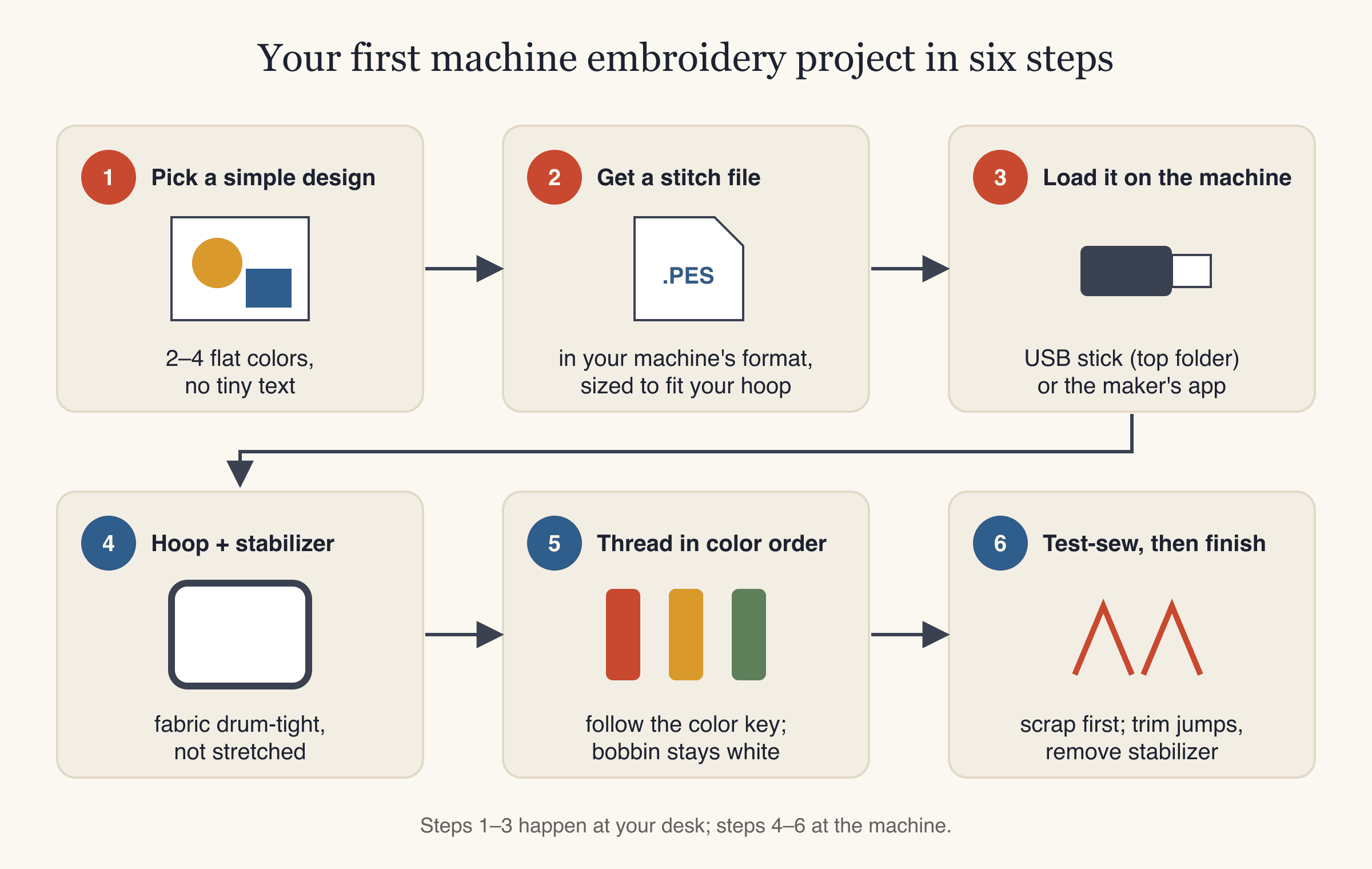
The whole first project in six steps. The first three happen at your desk, the last three at the machine.
Step 1: Pick a simple design
Choose a design with two to four flat colors, clear shapes and no tiny text, about 75–95 mm across. A built-in design from your machine is a fine first choice. Small lettering needs room to stitch: letters should be at least about 5 mm tall on woven fabric and 6 mm on T-shirt knits.
Step 2: Get a file for your machine
If you're using a built-in design, skip to Step 4. If you want to stitch your own artwork, a logo or a drawing, it needs to be digitized first.
This is where StitchFile fits in. Upload an SVG, PNG or JPG at stitchfile.app, choose a size (the 4×4 hoop preset is 95 mm; Left chest is 90 mm) and the fabric. The fabric choice sets stitch density, pull compensation and the stabilizer we recommend. In about 20 seconds you get a free stitch preview, the stitch count, the thread colors in sewing order and the smallest hoop the design fits. If any text is too small for the size, the preview says so and suggests a size that would work. Every download includes PES, DST, JEF, EXP and VP3, so it doesn't matter which brand of machine you have.
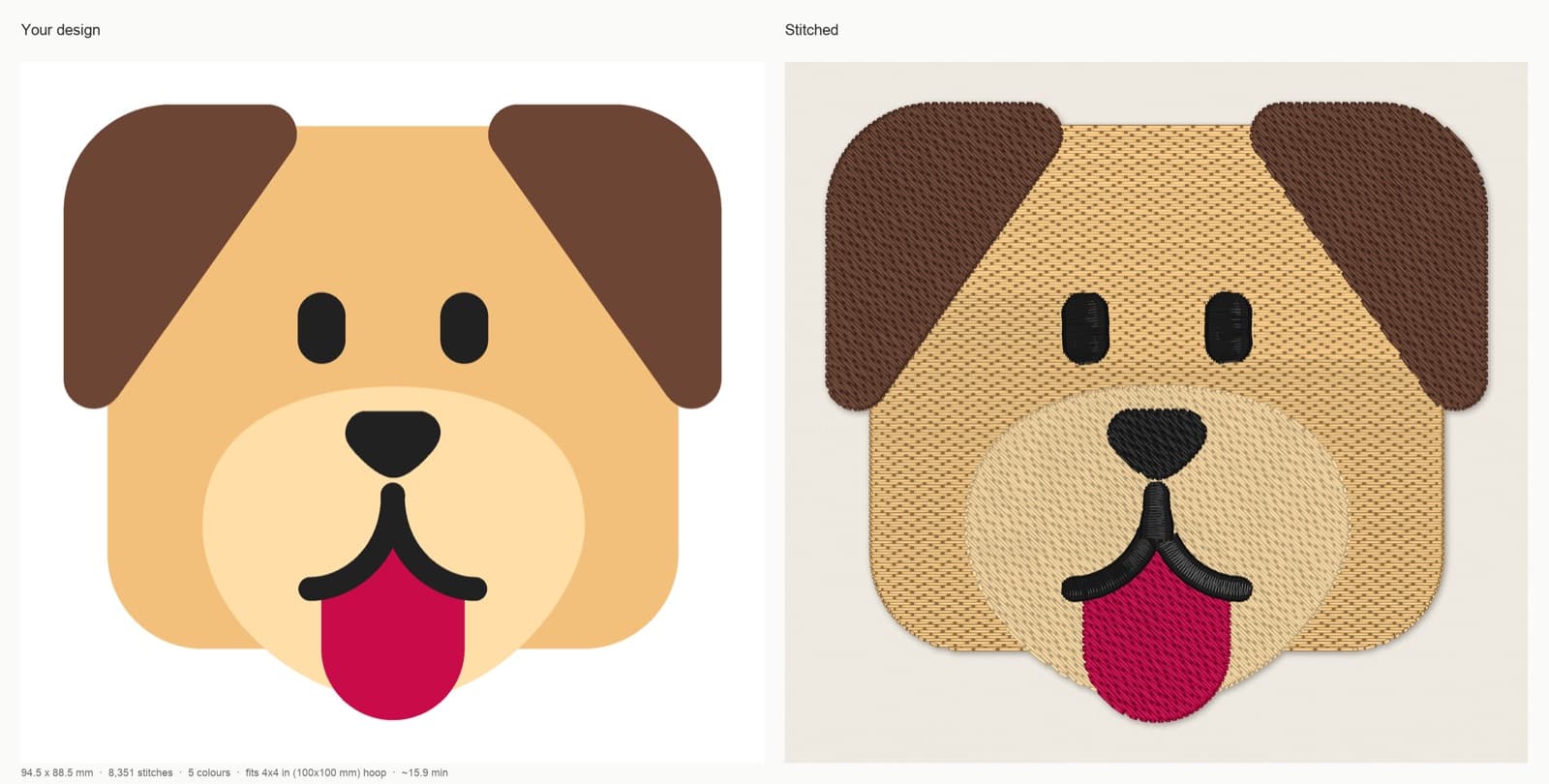
StitchFile stitch preview at the 4×4 hoop preset on woven fabric: 94.5 × 88.5 mm, 8,351 stitches, 5 colors, about 15.9 minutes at 700 stitches per minute. A good size for a first project.
Dog artwork: Microsoft Fluent Emoji, copyright (c) Microsoft Corporation, MIT License. Stitch preview generated by StitchFile from the artwork.
Step 3: Load the design onto the machine
- If the file came as a .zip, unzip it first. Machines can't open .zip files.
- Copy only the file in your machine's format (for example the .pes file) to the top folder of the USB stick, not inside another folder.
- Safely eject the stick, plug it into the machine, and open the design from the USB menu.
- If your machine receives designs through the maker's app or wirelessly, import the file in your machine's format there instead.
Step 4: Hoop the fabric and stabilizer
Hooping is the single biggest factor in how your first stitch-out looks.
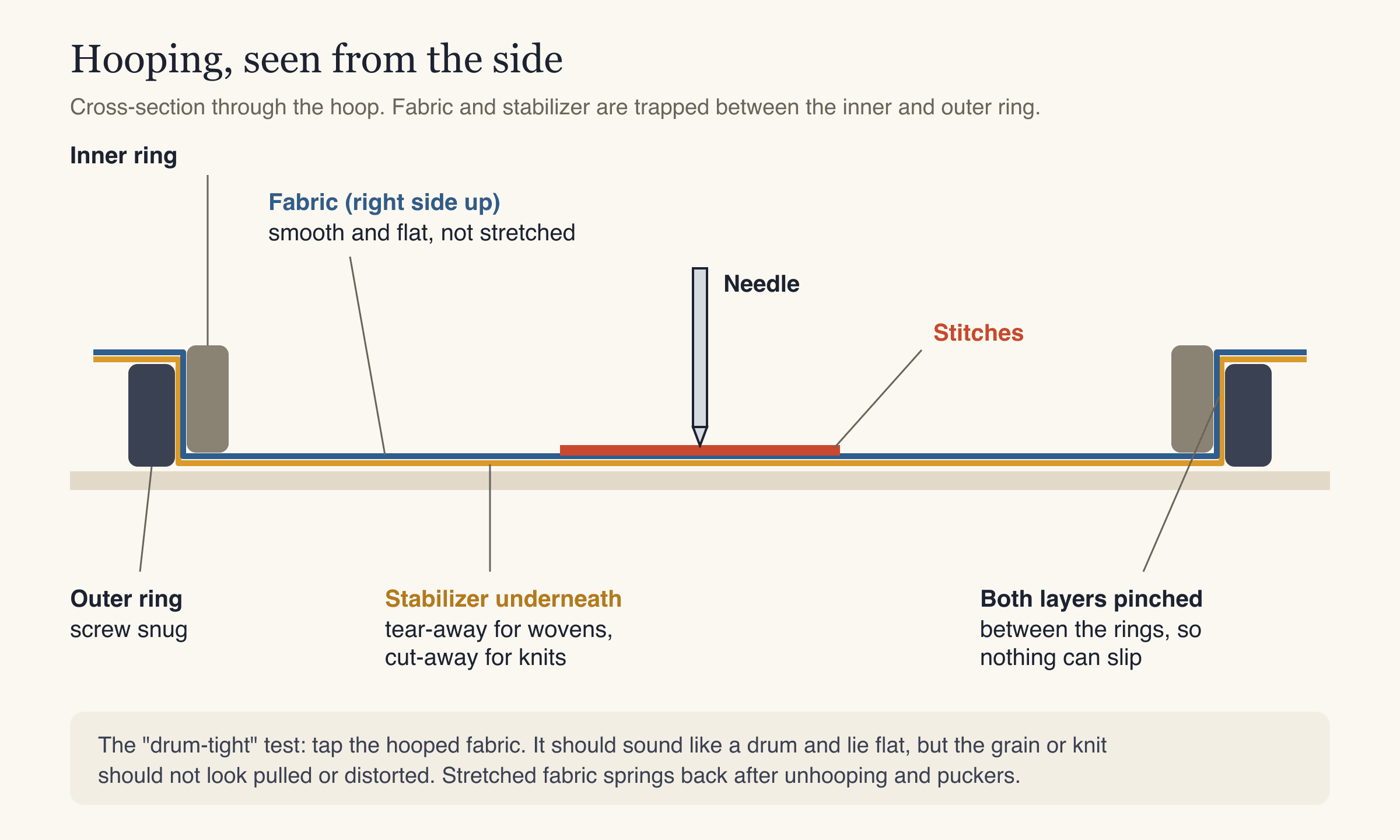
Fabric on top, stabilizer underneath, both trapped between the rings. Tight, but not stretched.
- Loosen the screw on the outer ring and lay it on a flat table.
- Lay the stabilizer on the outer ring, then the fabric on top, right side up. Both should overlap the hoop on every side.
- Mark the center of where you want the design and line it up with the hoop's center marks.
- Press the inner ring down into the outer ring. Tighten the screw.
- Tap the fabric. It should be smooth and drum-tight. If the weave or print looks pulled out of shape, re-hoop rather than tugging it tighter.
Step 5: Thread the machine and check the bobbin
- Put in a fresh embroidery needle (75/11 for most woven fabrics).
- Fill or insert a bobbin of embroidery bobbin thread.
- Thread the first color with the presser foot up. On most machines the tension discs only open with the foot up, so threading with it down is a common cause of loops and nests.
- Keep the thread color list next to the machine. The machine stops at each color change and tells you which number comes next.
Step 6: Position, trace, and sew
- Attach the hoop to the embroidery arm.
- Use the machine's trace or layout function to move the needle around the outline of the design. Make sure it stays inside the hoop and nothing is in the way.
- Lower the presser foot if your machine needs you to, and press start.
- Stay close for the first minute. Watch for thread breaks, loops on top, or the fabric lifting.
- At each stop, rethread the next color, trim the tail of the old one if needed, and continue.
Step 7: Finish
- Remove the hoop from the machine, then the fabric from the hoop.
- Tear away the stabilizer gently, holding the stitches with your thumb, or trim cut-away about 1/4 in from the design.
- Trim any jump threads on top and the back.
- Press from the back with a cloth between the iron and the stitches.
Always sew a design on scrap fabric with the same stabilizer before you sew it on the real item. It costs a few minutes and catches size, color and hooping problems before they ruin a shirt.
Common beginner mistakes
| Mistake | What happens | Fix |
|---|---|---|
| No stabilizer, or the wrong kind | Puckers, wavy fabric, gaps between colors | Match stabilizer to fabric; cut-away for knits |
| Stretching fabric in the hoop | Puckers once the fabric is unhooped | Hoop tight but without pulling the fabric |
| Using a sewing needle or an old needle | Thread shredding, skipped stitches | Fresh embroidery needle in the right size |
| Threading with the presser foot down | Loops on top, bird's nest underneath | Rethread with the foot up |
| Design bigger than the hoop | Machine refuses the design | Resize the file to fit your hoop's sewing field |
| Copying a .zip to the USB stick | Machine doesn't see the file | Unzip, copy only the machine file to the top folder |
| Tiny text | Letters merge into blobs | At least 5 mm letters on wovens, 6 mm on knits |
| Starting on a T-shirt | Stretching, puckering | Start on stable woven fabric; knits once you're comfortable |
When something does go wrong, the machine embroidery troubleshooting guide goes through each problem.
FAQ
Is machine embroidery hard for beginners?
No, but there is a learning curve. The machine does the stitching; your part is choosing a good design, hooping well, using the right stabilizer and threading correctly. Most beginners get a clean result within the first few projects if they test on scraps first.
What size hoop should a beginner embroidery machine have?
A 5×7 in (130×180 mm) sewing field covers most first projects, from left-chest logos to tote bags and towels. A 4×4 in field limits you to small designs. If you plan big designs or jacket backs, look for a larger embroidery area from the start, because the maximum hoop size can't be changed later.
What needles do I need for machine embroidery?
Embroidery needles, size 75/11, cover most fabrics: sharp points for wovens and ballpoints for knits. Use a 90/14 for denim, canvas and thick caps. Replace the needle as soon as you see skipped stitches or thread shredding.
What thread is used for machine embroidery?
40 weight embroidery thread on top, usually polyester (strong and colorfast) or rayon (soft, high sheen). In the bobbin, use thin embroidery bobbin thread rather than your top colors. Regular sewing thread is thicker and duller and isn't made for embroidery speeds.
Can I use my own designs on an embroidery machine?
Yes, once they're turned into an embroidery file in your machine's format. A picture or logo has to be digitized first, so the machine knows each stitch. You can upload artwork to StitchFile to get the file in all five common formats.
Which file format does my embroidery machine use?
Brother and Baby Lock use PES, Janome uses JEF, Husqvarna Viking and Pfaff use VP3, Bernina uses EXP, and most commercial multi-needle machines use DST. Your manual lists every format your machine reads.
Stitch your first design
Choose a simple design, hoop a scrap of woven cotton with tear-away stabilizer, and run a test. When you're ready to stitch your own artwork, upload it to StitchFile, pick your hoop size and fabric, and check the free stitch preview before you sew. Once you've got the basics, a cap is a good next step: see how to embroider a hat.