Embroidery guide
Free Embroidery Software Compared: What Each Program Really Does
Free embroidery software compared: Ink/Stitch, Embrilliance Express, My Editor, Artspira and more, by platform, formats, digitizing and real cost.
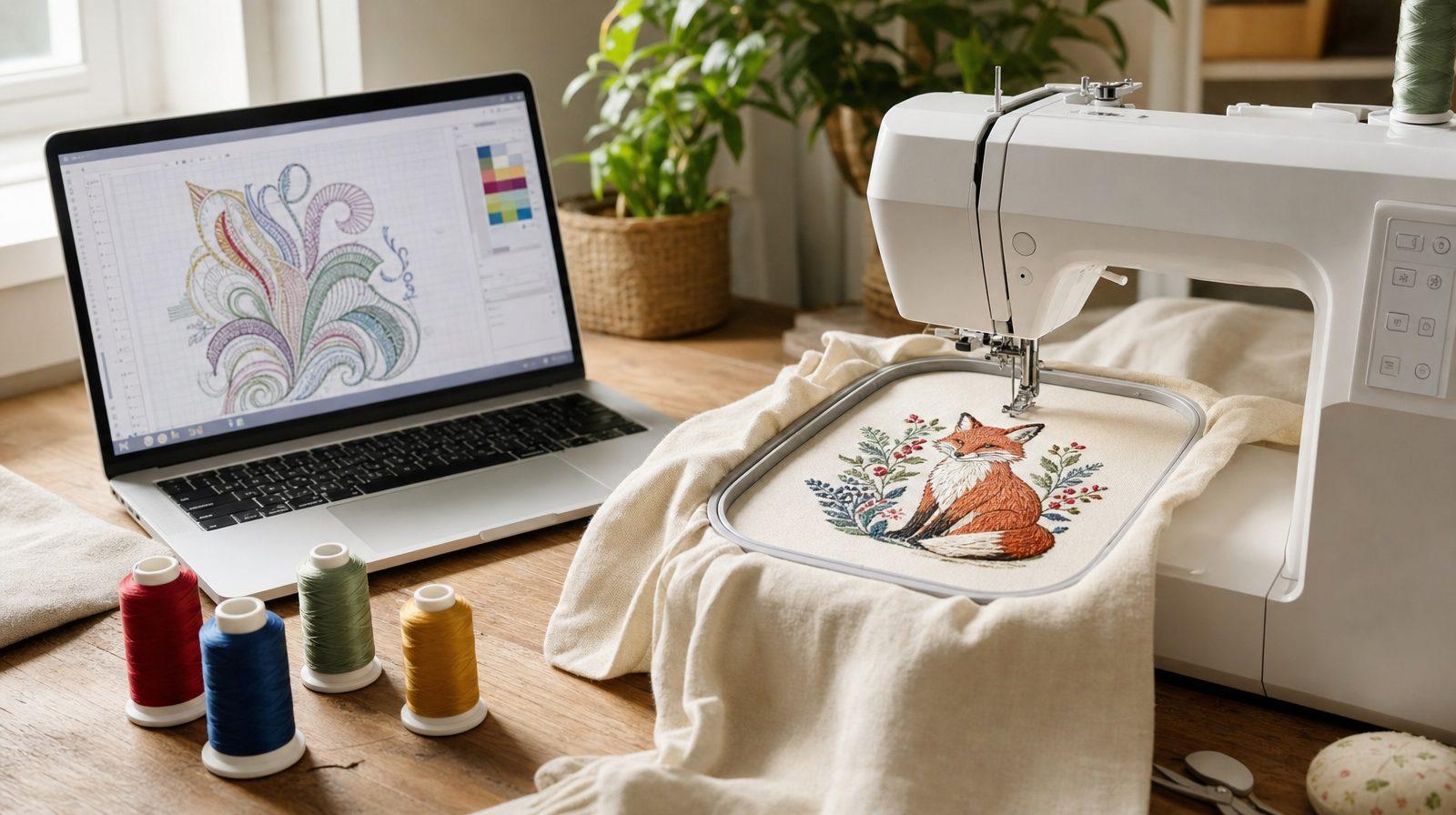
Short answer: The best free embroidery software depends on what you start with. If you already have embroidery files, a free viewer or editor such as Embrilliance Express or My Editor lets you open, re-save and (in some) resize them. If you want to turn artwork into stitches yourself, Ink/Stitch is the free, open-source choice for Windows, Mac and Linux, with a real learning curve. Brother's free Artspira app works with Brother wireless machines, but turning a picture into embroidery needs the paid Artspira+. If you'd rather not digitize by hand, an automatic digitizer such as StitchFile gives a free stitch preview and charges only when you download the machine files.
"Free embroidery software" is one of the most searched phrases in machine embroidery, and one of the most confusing. A free program might only open a design, or it might let you build one stitch by stitch. Some programs that used to be free are now subscriptions or have been discontinued, and several "free" downloads are time-limited trials of paid suites.
This guide sorts it out. We checked every program below against its maker's own website in November 2026 and left out anything we couldn't confirm there. You'll find what each program actually does, which computers it runs on, which formats it writes, where the limits are, and how to decide whether free software is really the cheapest route for your designs.
What "free embroidery software" can mean
Embroidery software does five quite different jobs. Most free programs do one or two of them.
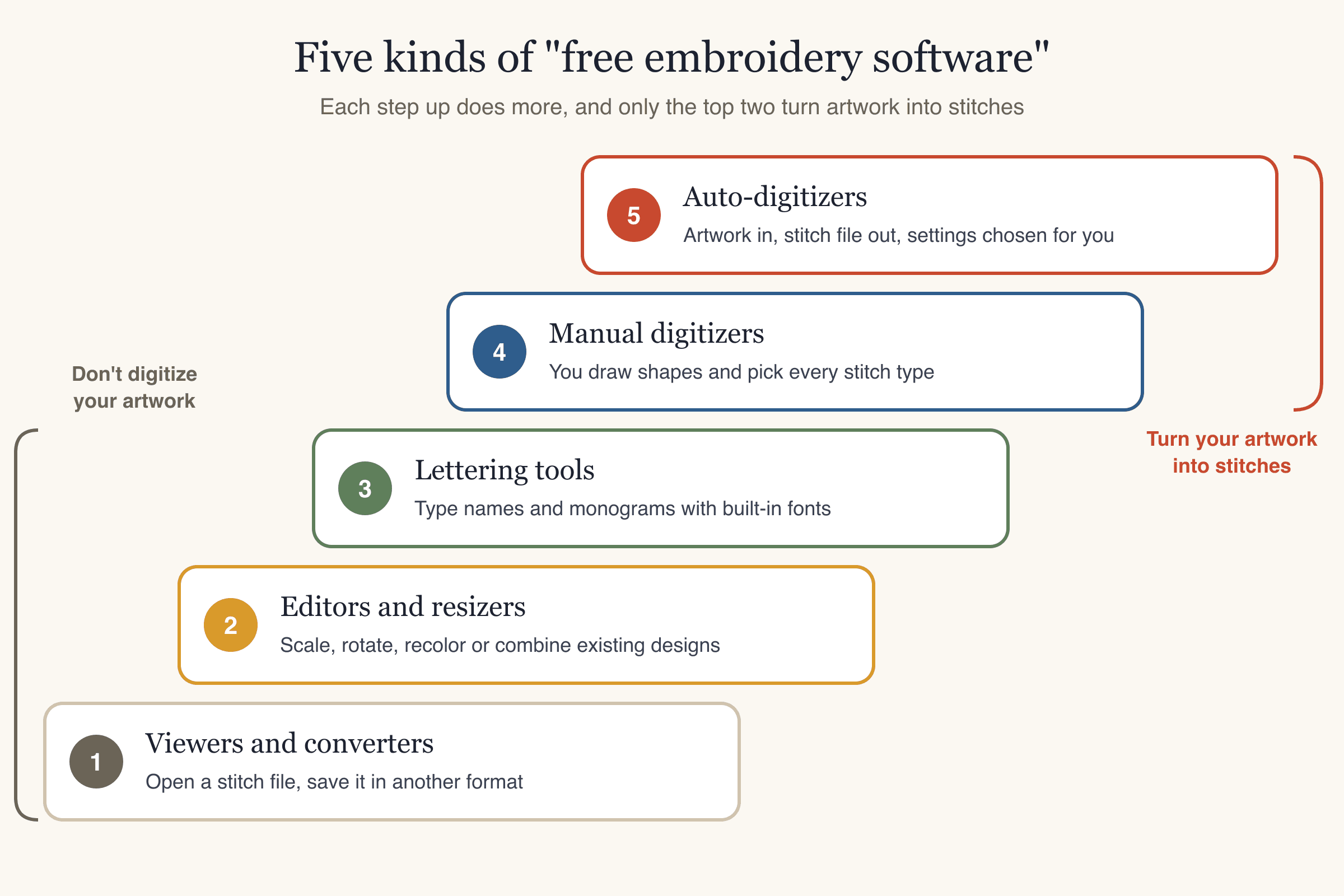
- Viewers and converters open an existing stitch file (PES, DST, JEF and so on), show it on screen, and save it in another machine format.
- Editors and resizers change an existing design: scale it, rotate it, recolor it or combine it with another design. Good editors recalculate the stitches when you resize; crude ones just stretch them.
- Lettering tools add names and monograms using fonts that were already digitized for embroidery.
- Manual digitizers turn artwork into stitches, but you do the work: you trace the shapes and choose the stitch type, direction, density and underlay (the stitches sewn first to hold the fabric down) for each one.
- Auto-digitizers turn artwork into stitches automatically. You upload an image, choose a size, and the software makes the stitch decisions.
Only the last two create a design from a logo or picture. That is what most people mean by "free embroidery digitizing software," and it is where free options are the thinnest. If you're not sure what digitizing involves, our guide on how to digitize a logo for embroidery walks through every decision.
Free embroidery software at a glance
These two tables compare the free programs most people find, plus StitchFile as the automatic option. "Not listed" means the maker's website doesn't say, so we haven't guessed.
Cost, platforms and who each program suits
| Program | Cost | Platforms | Learning curve | Best for |
|---|---|---|---|---|
| Ink/Stitch | Free, open source (GPL-3.0) | Windows, macOS 12+, Linux (runs inside Inkscape) | High | Learning to digitize on any computer |
| Embrilliance Express | Free, no registration | Windows, macOS | Low | Typing names with BX fonts you own |
| My Editor | Free, registration required | Windows (Vista to 10 listed) | Low to medium | Viewing, converting and resizing on a Windows PC |
| Wilcom Truesizer | Yearly subscription with a 14-day trial; included with a paid Wilcom Library licence | Web browser (see notes) | Low | Resizing existing designs if you have a Library licence |
| BERNINA ARTlink 9 | Was free; now listed as discontinued | Windows (Mac only via Boot Camp) | Low | Existing installs only |
| Brother Artspira | Free app; Artspira+ $12.99/month or $119.99/year (US) | iPhone, iPad, Android | Low | Owners of Brother wireless machines |
| StitchFile | Free preview; pay per design or a plan | Any web browser, plus iPhone, iPad and Android apps | Low | Turning a logo or flat artwork into a machine file quickly |
What each program can do
| Program | View / convert | Resize / edit | Lettering | Digitizing | Formats it writes |
|---|---|---|---|---|---|
| Ink/Stitch | Reads many formats | Yes, you edit the vector shapes | Yes, ready-made fonts | Manual (no one-click image conversion) | DST, EXP, JEF, PES, VP3, XXX, U01 and more |
| Embrilliance Express | Opens .BE designs, saves to your machine's format | No resizing in Express mode | Yes, with .BX fonts | No | Machine format chosen when saving (Express list not published) |
| My Editor | Yes, opens and saves many formats | Resize, rotate, stitch editor | Not listed | No | Many machine formats (list not published) |
| Wilcom Truesizer | View, export | Resize with stitch recalculation, rotate, recolor | Not listed | No | 24 machine formats, including .EMB |
| BERNINA ARTlink 9 | Yes | Rotate, scale, mirror, skew, thread colors | No | No | .ART, BERNINA .EXP and other machine formats |
| Brother Artspira | Uploads PES, PHC, PHX and DST | Basic editing | Not listed for the free plan | Drawing tool free; image to embroidery in Artspira+ | None: sends designs to the machine wirelessly |
| StitchFile | No (starts from artwork) | Free edits and re-runs at another size | Restyles lettering in your artwork (satin or fill) | Automatic | PES, DST, JEF, EXP and VP3 in every purchase |
Three popular paid suites also offer free trials. They are trials, not free software, and they're covered in their own section below.
The free programs, one by one
Ink/Stitch
What it is: a free, open-source machine embroidery platform built as an extension for Inkscape, the free vector drawing program. It is licensed under GPL-3.0, and the current release when we checked was version 3.3.0 (July 2026).
Platforms: Windows (64-bit), macOS 12 Monterey or newer (Apple Silicon and Intel), and Linux. You install Inkscape first, then Ink/Stitch.
What it does:
- Manual digitizing. You draw or import vector shapes, then set how each one is stitched: running stitch, satin column, several kinds of fill (tatami, contour, circular, meander, gradient and others), with settings for stitch length, density, underlay, direction and pull compensation (making shapes slightly wider because thread pulls fabric inward).
- Lettering with a long list of ready-made embroidery fonts.
- A stitch simulator so you can watch the design sew on screen before exporting.
- Formats: it reads about 40 embroidery formats and writes DST, EXP, JEF, PES, PEC, VP3, XXX, U01, TBF and G-code, among others.
Limits: there is no one-click "turn this picture into embroidery" command. A PNG or JPG has to be traced into vector shapes in Inkscape first, and the Ink/Stitch documentation itself warns that automatic tracing often creates tiny or fragmented shapes that don't stitch well. The project also notes that PES and PEC files can't hold more than 255 color changes.
Who it suits: people who want to learn digitizing as a skill, on any operating system, and don't mind investing time. It is the most capable genuinely free option, and the only open-source one in this list.
Embrilliance Express
What it is: the free "Express mode" of the Embrilliance platform. Embrilliance says it is free with no strings attached and doesn't ask for personal information.
Platforms: Windows 7, 10 and 11, and macOS 10.13 to 15 (with a separate installer for older Macs running OS X 10.9 to 10.12).
What it does: it opens designs in Embrilliance's .BE format, shows them, and saves them in your machine's stitch format. It also lets you install fonts sold in the .BX format and type lettering with them.
Limits: Embrilliance's help pages for Express mode say you can't resize designs or merge your lettering with other stitch files; those features are in Embrilliance's paid programs. Digitizing isn't part of Express. Embrilliance publishes the list of formats its paid programs export, but not a separate list for Express.
Who it suits: anyone who buys BX lettering fonts and wants a free way to type a name and save it for their machine, on Windows or Mac.
My Editor
What it is: a free viewing and editing program from Wings Systems. Registration is required; the download details are sent by email.
Platforms: Windows. The maker lists Vista, 7, 8.1 and 10; Windows 11 and Mac aren't mentioned.
What it does: shows designs with their thread colors, opens and saves "many different embroidery machine file formats," resizes and rotates designs, includes a stitch editor, selects objects by color, and prints a detailed worksheet. It also exports a picture of the design as JPG, PNG, TIFF or BMP.
Limits: it doesn't digitize artwork, lettering isn't mentioned, and the maker doesn't publish the list of formats it supports. Check that your machine's format is included after installing.
Who it suits: Windows users who need to view, convert or resize existing designs for free.
Wilcom Truesizer
What it is: Wilcom's design viewing and resizing tool. Wilcom's FAQ still describes Truesizer as its free viewing and resizing tool, but the current product page sells it as a yearly subscription with a 14-day free trial. It is included at no extra cost with every paid Wilcom Library licence (Wilcom values that at US$49 a year). We found no free standalone version on Wilcom's website as of November 2026, and the older desktop TrueSizer Pro e4 is listed as discontinued.
Platforms: the product page says it runs in a web browser on PC, Mac and tablet, with no download. The FAQ on the same page also calls it a separate Windows application, so check the current details with Wilcom before you rely on Mac support.
What it does: views designs with their stitch count and size, resizes them with stitch recalculation, flips, rotates and recolors them, prints production worksheets, and exports to 24 machine formats, including Wilcom's .EMB.
Limits: no lettering or digitizing is mentioned, and you need a Wilcom account to start the trial.
Who it suits: people who already pay for a Wilcom Library licence, or who need to resize a batch of existing designs during the trial.
BERNINA ARTlink 9
What it is: BERNINA's free embroidery software for opening and adjusting designs. BERNINA's software pages now list ARTlink 9 as discontinued and no longer available, so it is only relevant if you already have it installed.
Platforms: Windows. BERNINA's own guide says it can run on a Mac only through Boot Camp with Windows 10 or 11 installed.
What it did: opened designs in different formats, converted them to other formats, sent them to a BERNINA machine or USB stick, exported files for non-BERNINA machines, rotated, scaled, mirrored and skewed designs, assigned thread colors and printed a paper template. When you scale a design, it adds or removes stitches rather than stretching them.
Limits: no lettering, no combining designs and no digitizing; BERNINA keeps those for its paid embroidery software.
Who it suits: BERNINA owners who already have it installed and need to resize or convert an existing design.
Brother Artspira and Artspira+
What it is: Brother's app for its wireless embroidery machines, ScanNCut DX cutters and fabric printers. There is a free version and a paid subscription, Artspira+, at $12.99 a month or $119.99 a year in the US, with a free one-month trial.
Platforms: iPhone and iPad (iOS/iPadOS 15 or later) and Android 8 or later. Brother lists no Windows or Mac version.
What the free version does: basic editing tools and an embroidery drawing tool, unlimited transfers to your machine, and storage for up to 20 of your own designs. You can upload embroidery files in PES, PHC, PHX and DST formats.
What needs Artspira+: "Image to Embroidery," which turns your own photos and images into digitized or cross-stitch embroidery, is available only with an Artspira+ subscription, along with AI image treatments, the AI Font Decorator and storage for up to 100 designs.
Limits: Artspira is cloud-based and doesn't let you download designs as files; they are sent wirelessly to a compatible Brother machine. It works with Brother's wireless-enabled embroidery machines (F, LB, PE, SE, and Innov-is BP, NS, NQ, NV, M and XP series), so it's no help for other brands or older machines without wireless.
Who it suits: owners of a recent Brother wireless machine who want to edit and send designs from a phone or tablet.
Free trials of paid digitizing suites
Searches for free digitizing software often lead to download pages for paid programs. These are trials. They are useful for testing a program on your own computer before you buy, but they are not a long-term free option.
| Suite | Trial | Platforms | Auto-digitizing |
|---|---|---|---|
| Hatch Embroidery 4 | 30 days, every tool and level included; you sign in with a registered account | Windows 11 (64-bit) only; the trial doesn't run on a Mac or in a virtual machine | Yes, included in the trial |
| Brother PE-DESIGN 11 | Feature-limited trial with no stated time limit: you can't save, export, print or send a design to a machine | Windows only | In the full product (Auto Punch and PhotoStitch); the trial page doesn't say whether these work in the trial |
| Embird | Demo works for 30 days without registering; demo plug-ins have other limits | Windows 7 to 11; on a Mac only through Wine, Parallels or CrossOver | The program includes automatic image-to-stitch tools; the demo's limits for them aren't stated |
The pattern is clear: full auto-digitizing desktop suites are paid, mostly Windows-only, and their trials either expire or stop you from saving a file.
Free embroidery software for Mac
Most of the programs in this guide are Windows-only, so Mac owners have fewer choices:
- Ink/Stitch runs natively on macOS 12 Monterey or newer, on both Apple Silicon and Intel Macs. It is the only free manual digitizer with a native Mac version in this list.
- Embrilliance Express has native Mac versions for macOS 10.13 to 15 and older OS X releases, for viewing, saving and BX lettering.
- Browser-based tools don't care which computer you use. StitchFile runs in any browser, including Safari and Chrome on a Mac, and Wilcom's product page says Truesizer runs in a browser too.
- iPad apps are another route: Brother's Artspira runs on iPad (for Brother wireless machines), and the StitchFile app runs on iPhone and iPad.
Windows-only programs, including My Editor, BERNINA ARTlink, PE-DESIGN 11, Hatch and Embird, need Windows running on the Mac (through Boot Camp on older Intel Macs, or virtualization software). Hatch's trial specifically doesn't run on a Mac or in a virtual machine, so always check the system requirements before you download.
Free embroidery software for Brother machines
Brother and Baby Lock machines read the PES format. Your free options:
- Artspira is Brother's own free app for wireless machines. It edits and sends designs from a phone or tablet but doesn't save PES files you can keep, and turning images into embroidery needs Artspira+.
- Any free program that writes PES works with a Brother machine through a USB stick: Ink/Stitch writes PES, and Embrilliance's platform programs list PES among their export formats.
- PE-DESIGN 11, Brother's own digitizing software, has a free trial, but the trial can't save or export a design, so it's for trying the software rather than making files.
- StitchFile includes a PES file in every download, alongside the other four formats, so the same purchase also works if you later switch to a Janome, Bernina or commercial machine.
Older Brother machines without wireless can't use Artspira at all, which makes a USB-based route the practical one. Our guide to embroidery file formats explains PES and the other formats in detail.
Open-source embroidery software
If you specifically want open-source embroidery software, Ink/Stitch is the established choice. It is released under the GPL-3.0 licence, its source code is public, and it is built on Inkscape, which is also open source. That means:
- No cost and no license key, on Windows, Mac and Linux, including Linux packages for x86_64, i386 and arm64.
- A community-driven project: features and fonts come from contributors, and the documentation is public.
- Full manual control over stitch types and settings, which is exactly what makes the learning curve steep.
Open source doesn't mean automatic. Ink/Stitch expects you to prepare clean vector shapes and choose how each one is stitched. If you want the stitch decisions made for you, you need an auto-digitizer.
Online embroidery software
"Online embroidery software" usually means one of three things:
- Browser-based design tools. Wilcom sells Truesizer as a browser app for viewing and resizing existing designs (with a 14-day trial).
- Cloud apps tied to a machine brand. Artspira stores your designs in the cloud and sends them to Brother wireless machines.
- Online auto-digitizers. Several free web apps take an image and return a stitch file. They vary a lot in whether they ask for your fabric and size, whether you see a realistic preview, which formats you get, and whether the file is checked before you sew it. StitchFile is in this group, with a different deal: the digitizing and the stitch preview are free, and you pay only to download the files.
The big advantage of online tools is that nothing needs installing, so they work the same on a Mac, a Windows PC, a Chromebook or a tablet. The thing to check is what you actually get before paying: a stitch preview drawn from the real machine file tells you far more than a flat picture.
Want to see your artwork stitched before you decide? Free embroidery digitizing on StitchFile turns a PNG, JPG or SVG into a realistic stitch preview in about 20 seconds, with no account. You pay only if you download the machine files.
StitchFile: the automatic option
StitchFile isn't free software in the same sense as the programs above. It is an automatic digitizer with a free preview and paid downloads, and it fills the gap the free programs leave: turning a logo or flat artwork into a machine file without learning to digitize.
- What's free: uploading a PNG, JPG or SVG, automatic digitizing for the size and fabric you choose, a stitch preview drawn stitch by stitch from the real machine file, the stitch count, thread colors, sew time and smallest hoop, and a mock-up of your design on a T-shirt and cap. Edits are free with a free account.
- What you pay for: downloading the files. Pay per design (the price is shown before you pay), or from $2.90 a design with a 10-pack. Selling what you make needs the Pro plan ($19 a month for 25 designs) or the Shop plan ($49 a month for 100 designs).
- What every purchase includes: PES, DST, JEF, EXP and VP3, a thread color key in sewing order with the stabilizer to use, a full report, free re-sizes for 7 days, and a sew-out guarantee: if a file sews badly, send a photo and the team re-runs it free or refunds that design (designs made from photos aren't covered).
- Where it runs: any web browser on Mac or Windows, plus StitchFile apps for iPhone, iPad and Android.
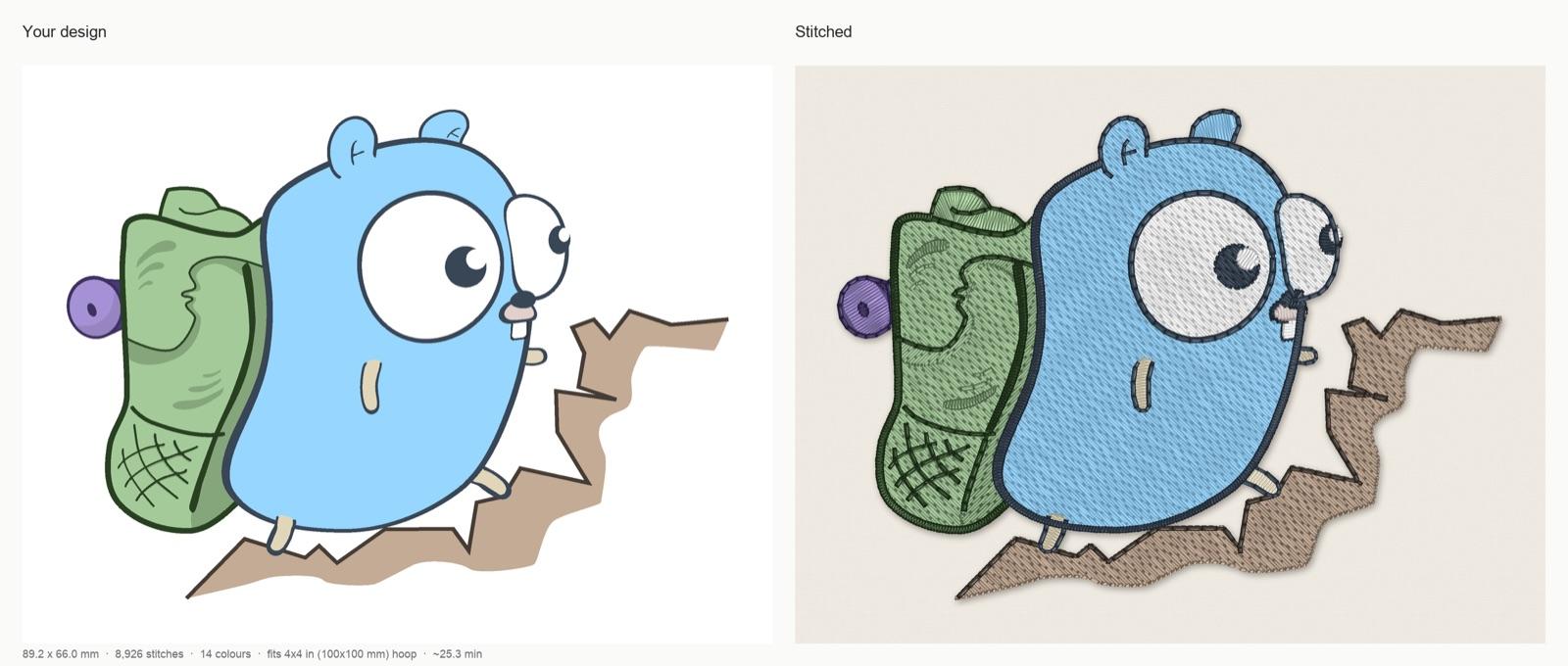
A real StitchFile preview, digitized automatically at 90 mm for woven fabric. From the design's report: 89.2 × 66.0 mm, 8,926 stitches, 12 thread colors in 14 color stops, 60 trims, about 25 minutes at 700 stitches per minute, fits a 4×4 in (100×100 mm) hoop. Six see-through shading shapes were skipped because they can't be sewn, and the report lists that change.
Hiking gopher artwork by Egon Elbre, CC0. The Go gopher was designed by Renée French. Stitch preview generated by StitchFile from the artwork.
What it doesn't do: it doesn't open or edit embroidery files you already have, it doesn't type new lettering from fonts, and it isn't suited to specialty techniques such as 3D puff or appliqué. For those, a free editor or a manual program is the better tool.
How to choose free embroidery software
Start with what you already have, then with how much time you want to spend.
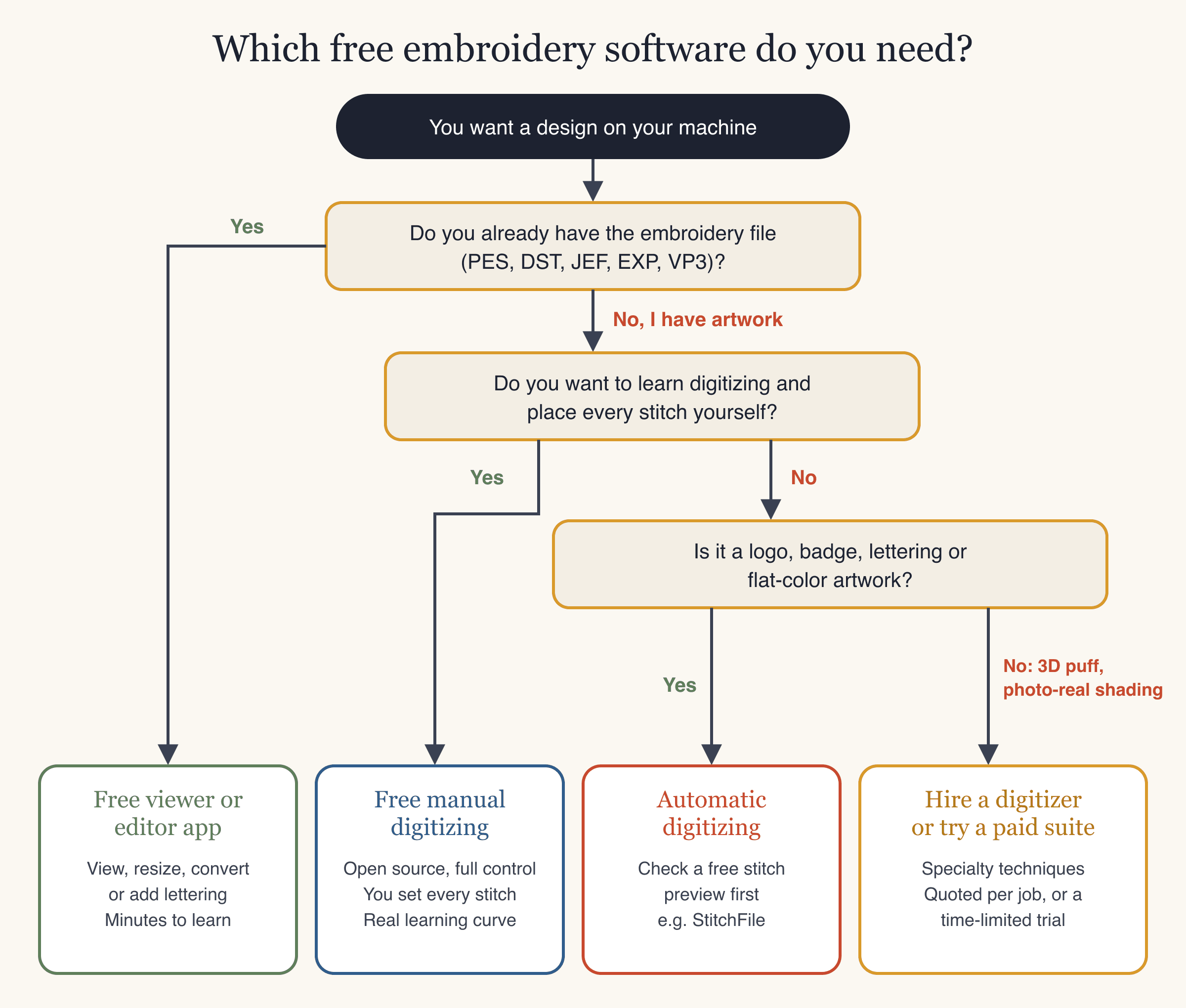
- You already have the embroidery file and need to view it, convert it or put a name on it: a free viewer or editor is enough. Pick one that runs on your computer and writes your machine's format.
- You have artwork and want to learn digitizing: Ink/Stitch is free on every major operating system. Budget time to learn it, and test-sew every design.
- You have a logo, badge, lettering or flat-color artwork and want a file quickly: use an automatic digitizer and judge it by its stitch preview before you pay or sew anything.
- You need 3D puff, appliqué or photo-real shading: hire a digitizer, or try a paid suite's trial on your own computer.
Two checks apply whatever you choose: confirm the program runs on your computer (Mac users especially), and confirm it writes the format your machine reads. For a broader look at paid desktop options, see our embroidery digitizing software guide.
When free software isn't the cheapest option
Free software costs nothing to download, but digitizing by hand costs time: tracing the artwork, choosing stitch types, setting density and underlay, ordering the colors, and fixing problems after a test stitch-out. Whether that's worth it depends on how much you value your time and how many designs you make.
A simple way to compare is to ask how many minutes of your time one paid design is worth. At the 10-pack price of $2.90 a design:
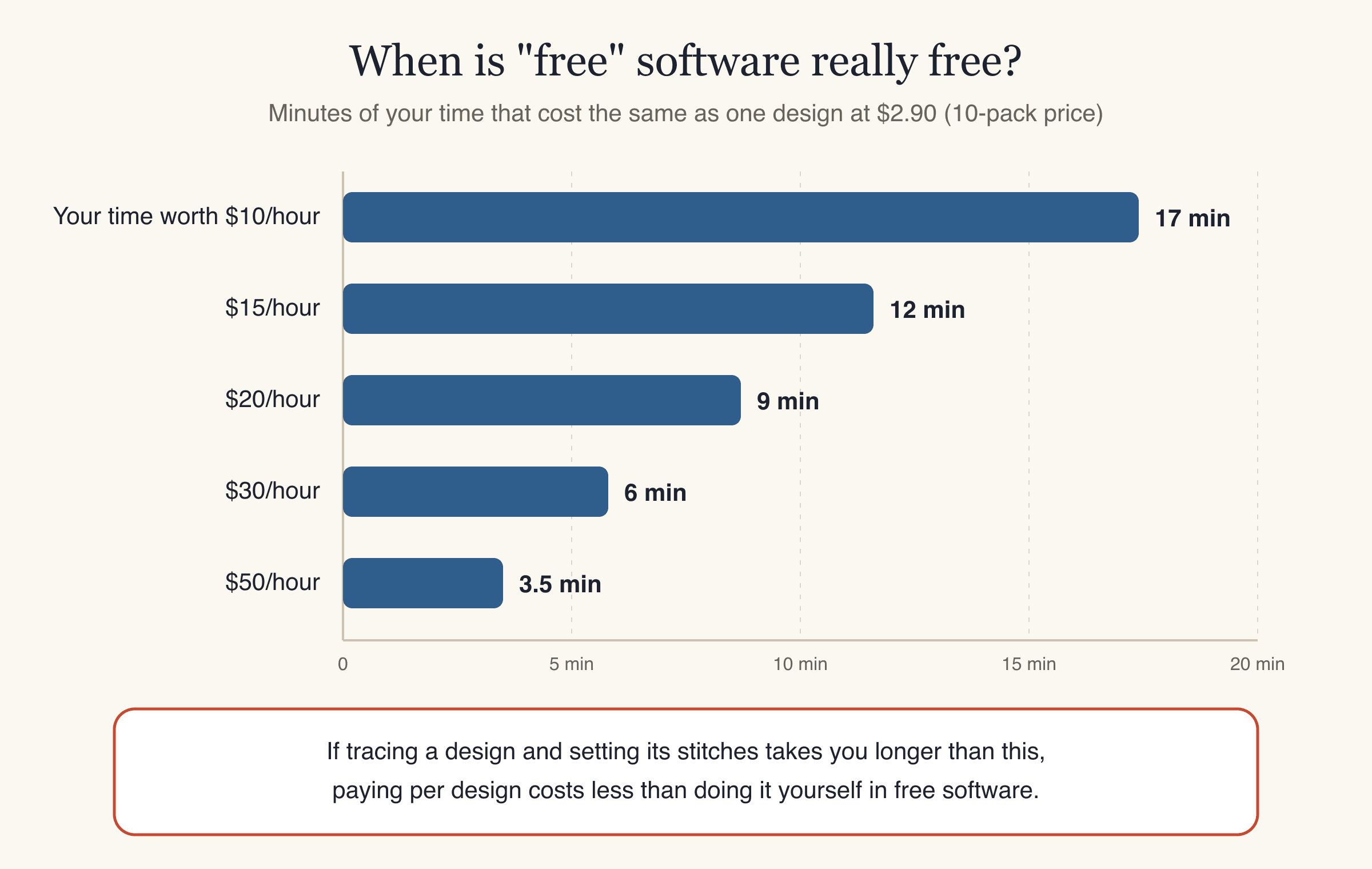
| What your time is worth | Minutes that cost the same as one $2.90 design |
|---|---|
| $10 an hour | About 17 minutes |
| $15 an hour | About 12 minutes |
| $20 an hour | About 9 minutes |
| $30 an hour | About 6 minutes |
| $50 an hour | About 3.5 minutes |
If tracing and setting up a design yourself takes longer than that, paying per design costs less. Count your learning time too: the first designs in any manual program take the longest.
The math changes in two cases. If you enjoy digitizing and want to get good at it, the time is the point, not a cost. And if you need a specialty technique that automatic tools don't handle, a manual program or a professional digitizer is the right tool regardless of price.
Common mistakes with free embroidery software
- Downloading a viewer and expecting it to digitize. Most free programs work only with existing embroidery files. Check whether a program turns artwork into stitches before you install it.
- Using a format converter to "convert" a picture. A converter changes PES to DST; it can't turn a PNG into stitches. That needs digitizing.
- Resizing a stitch file too far. Scaling a design a lot, especially in programs that stretch rather than recalculate stitches, changes stitch length and density. Re-digitize at the new size instead.
- Not checking your computer first. Many programs are Windows-only, and some trials don't run on a Mac or in a virtual machine at all.
- Forgetting the trial limits. Some trials expire after 30 days; others never expire but can't save or export a file.
- Choosing a program that doesn't write your format. Brother and Baby Lock use PES, Janome uses JEF, Tajima and most commercial machines use DST, Melco and Bernina use EXP, and Husqvarna Viking and Pfaff use VP3.
- Skipping the test stitch-out. Whatever made the file, sew it on scrap fabric with the right stabilizer before the real item.
Skip the learning curve for logos and flat artwork. Upload your design to StitchFile's free embroidery digitizing, check the stitch preview, and download PES, DST, JEF, EXP and VP3 only if you like the result.
FAQ
What is the best free embroidery software?
It depends on the job. For digitizing artwork yourself, Ink/Stitch is the most capable free program and runs on Windows, Mac and Linux. For viewing, converting or resizing existing files on Windows, My Editor is free with registration. For typing lettering with BX fonts on Windows or Mac, Embrilliance Express is free. If you want automatic digitizing, StitchFile gives a free stitch preview and charges only to download.
Is there free embroidery digitizing software?
Yes. Ink/Stitch is free, open-source digitizing software, but it is manual: you set the stitches for every shape yourself, and images have to be traced into vector shapes first. Free programs that digitize automatically are rare; paid suites include auto-digitizing and offer time-limited or feature-limited trials. Several online tools digitize automatically, and StitchFile's digitizing and stitch preview are free, with a fee only to download the files.
What free embroidery software works on a Mac?
Ink/Stitch runs natively on macOS 12 or newer, and Embrilliance Express has native Mac versions for viewing, saving and lettering with BX fonts. Browser-based tools such as StitchFile work on any Mac. My Editor, BERNINA ARTlink, PE-DESIGN, Hatch and Embird are Windows programs.
Is there free embroidery software for Brother machines?
Yes. Brother's Artspira app is free for Brother wireless embroidery machines, though turning images into embroidery needs the paid Artspira+ subscription and designs are sent wirelessly rather than saved as files. Any free program that writes PES, such as Ink/Stitch, also works with Brother machines through a USB stick.
Is there open-source embroidery software?
Yes. Ink/Stitch is open source under the GPL-3.0 licence and runs as an extension of Inkscape, the free vector drawing program. It is free on Windows, macOS and Linux and offers full manual digitizing and lettering, but no one-click image conversion.
Can free embroidery software turn a picture into an embroidery file?
Usually not on its own. Free viewers and editors only work with existing embroidery files, and Ink/Stitch needs the picture traced into vector shapes before you digitize it by hand. Brother keeps its image-to-embroidery feature in the paid Artspira+. An online auto-digitizer is the quickest route: StitchFile turns a PNG, JPG or SVG into a stitch preview for free, and you pay only to download the machine files.